You stand in the kitchen before breakfast, lift your arm, and see your pulse climbing after you rise from a chair. A minute later, it settles. Was that ordinary movement, a measurement error, or a pattern worth recording? A resting heart rate app is meant to help answer questions like this by organizing what your heart does between stillness, sleep, symptoms, and activity.
That distinction matters. A single number can look precise while hiding poor sensor contact, a missing sample, recent caffeine, dehydration, medication timing, or the effects of exercise. The useful app isn't the one that produces the most dramatic alert. It's the one that shows how the reading was collected, what context surrounded it, and whether the change persists.
These apps can run during sleep, help separate post-exercise recovery from true rest, support illness monitoring, and organize symptoms for people investigating possible POTS or dysautonomia. The practical questions are harder than “what features does it have?” You need to know which features change usefulness, how POTS detection works under the hood, why two apps can disagree about the same person, and when a reading deserves a call to a clinician instead of a dismiss button.
A Resting Heart Rate App in the Wild
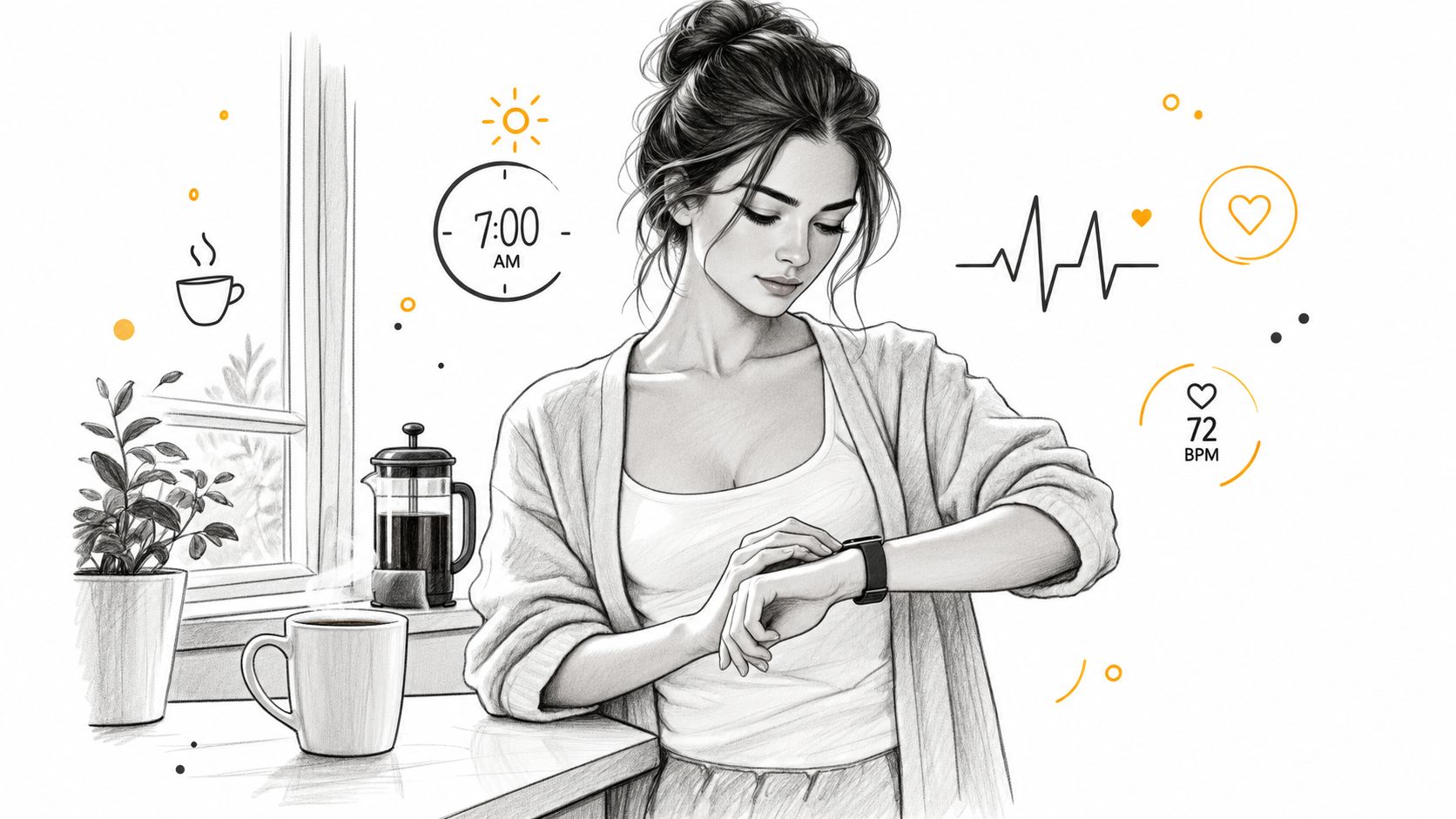
At seven in the morning, the number on your wrist may change before you feel fully awake. You stand to make coffee, notice a flutter or a rush in your chest, and glance down. The value rises, then begins to fall as you remain still. Your first instinct may be to decide whether the number is normal. A better first question is, what exactly was the watch measuring at each moment?
A resting heart rate app doesn't only describe a heart rate at rest. Its value comes from sorting measurements by situation. Overnight readings can help establish a personal baseline. Quiet daytime readings can provide a check against that baseline. Post-exercise readings belong to a recovery record, not the same trend as a waking resting value. A symptom note can explain why a seemingly unusual episode occurred.
The difference is similar to watching a short video instead of looking at one frame. The frame tells you what the heart was doing at a particular instant. The video shows whether the rate rose after standing, stayed high, returned toward baseline, or changed alongside dizziness, poor sleep, illness, or a medication change.
Practical rule: Treat the app as a recorder and organizer first. Treat its alert as a prompt to investigate, not as a diagnosis.
For people with suspected POTS, context becomes even more important. A brief pulse spike after walking across the room isn't automatically the same as a sustained postural response. An app must preserve posture, baseline, peak, timing, and duration if the record is going to help a clinician assess it.
The same principle applies to ordinary health tracking. A higher resting trend may accompany stress, illness, hard training, dehydration, or a change in medication. A lower reading may reflect only a different measurement condition. The app earns trust by making those distinctions visible rather than presenting every value as equally reliable.
What Resting Heart Rate Actually Means
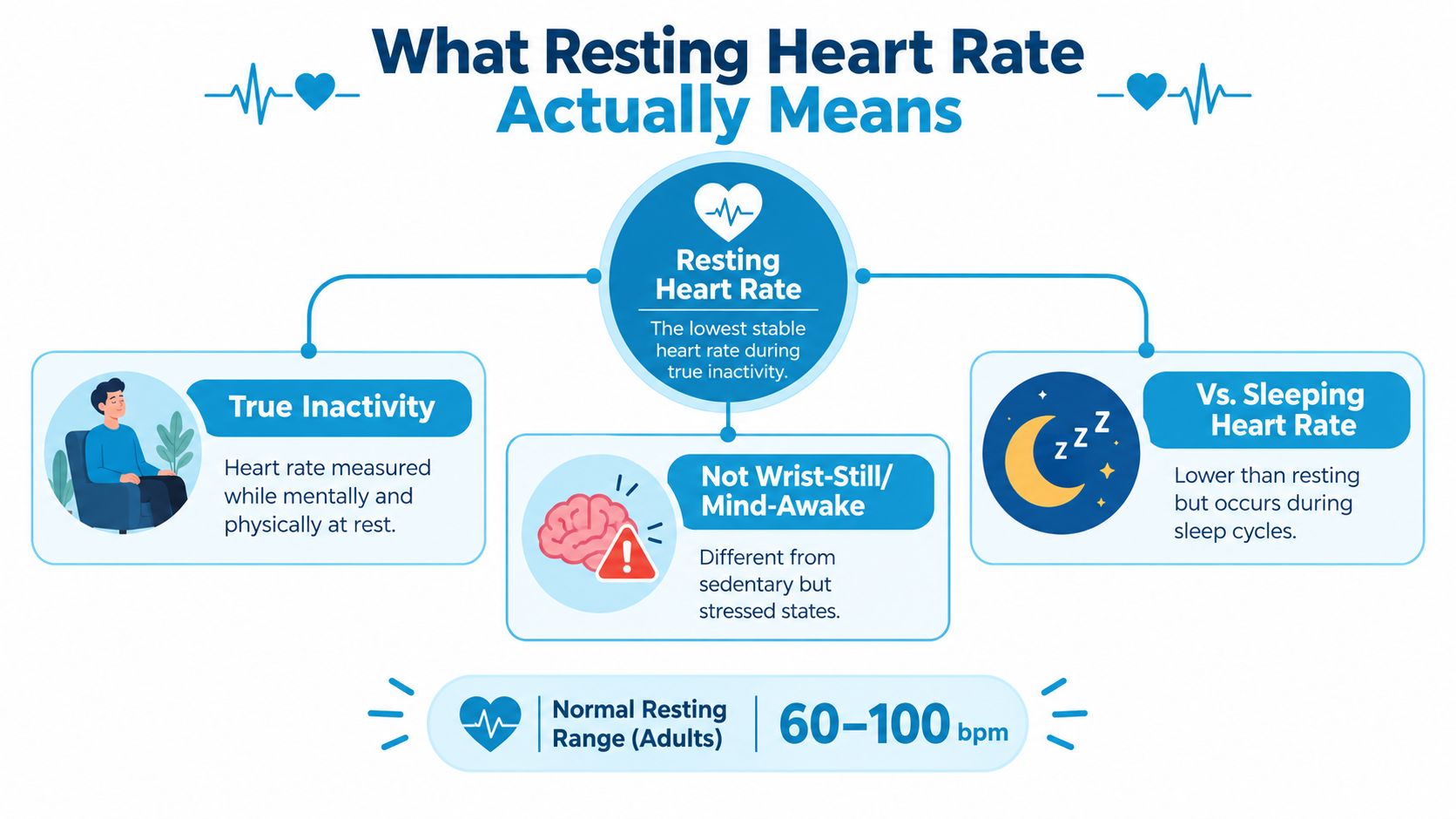
Resting heart rate is a heart rate measured while you're genuinely inactive and calm. Your wrist can be motionless while your mind is tense, you're digesting a meal, you've just climbed stairs, or you're waiting for an upsetting message. That stillness isn't necessarily a clean resting measurement.
Sleeping heart rate is a related but separate signal. It reflects the cardiovascular changes that occur during sleep, while a waking resting value is usually collected during a quiet period when you're awake. A seated reading during a meeting may also be useful, but it can include stress, conversation, digestion, or anticipation. Keep these signals labeled instead of blending them into one supposedly perfect baseline.
Read the trend, not the frame
Think of a traffic camera. A single frame may show one car at an intersection, but it can't tell you whether traffic is moving normally or backing up. A longer recording reveals direction and pattern. Your heart-rate data works the same way.
A single 72 beats-per-minute reading is one frame. A repeated trend can show whether your personal baseline is drifting upward during illness, stress, a demanding training period, or a medication change. That doesn't identify the cause by itself, but it gives you a more useful question to take to a clinician.
Research has linked higher resting heart rate with cardiovascular outcomes at the population level. A meta-analysis reported that every 10-beats-per-minute increase was associated with a 9% higher relative risk of all-cause mortality and an 8% higher relative risk of cardiovascular mortality, while another analysis found higher cardiovascular-mortality risk among people with resting heart rates above 80 beats per minute. These are population associations, not personal diagnostic cutoffs, as explained in the meta-analysis of resting heart rate and mortality.
Ask how the daily value was made
A daily value derived from repeated overnight samples may be more useful for trend tracking than a random afternoon reading. That doesn't make it automatically correct. You still need to know whether the app used a median, an average, a lowest value, or a filtered selection of samples.
Look for labels that tell you:
- Measurement context: Whether the value came from sleep, quiet sitting, recovery, or an unspecified moment.
- Data quality: Whether the app marks gaps, motion, weak contact, or low-confidence samples.
- Personal baseline: Whether it compares today's result with your own history instead of only a broad population range.
- Separate signals: Whether sleeping, waking, standing, and post-exercise readings remain distinct.
That foundation matters when you examine a rise after standing. Without a trustworthy resting baseline, an app can't tell the difference between a meaningful postural change and a noisy starting point.
The Features That Actually Matter
Feature lists often give equal weight to attractive extras and basic measurement quality. They shouldn't. For a symptom-monitoring app, prioritize the parts that determine whether you can interpret the record later.
Start with the measurement
The sensor and its algorithm come first. Optical wrist sensors can lose quality when the band is loose, the skin is cold, the wrist is moving, or contact changes. Darker skin tones and tattoos can also complicate optical signal capture in some circumstances. That doesn't make a wearable useless, but it does mean an app shouldn't imply that every displayed value has laboratory certainty.
The most honest test is comparison under controlled conditions. Sit still, check the wearable reading, and count your pulse manually for a full minute. Repeat on different days and compare values from the same moment. A cuff or clinical measurement can provide a stronger external comparison when a clinician recommends it, but no single comparison proves that an app is accurate in every situation.
Then examine privacy
Health data deserves a plain answer to a plain question: where do the samples go? Before granting access, check whether analysis happens on the device, whether data is uploaded, whether it can be deleted, and whether the company shares or monetizes de-identified information.
Apple explains that HealthKit data is stored in an encrypted database on the device and that users control app access. Those controls matter, but you still need to read the app's own privacy explanation because permission to read data isn't the same as a promise about every downstream use.
Passive detection beats manual memory
An app that computes resting values from repeated background samples can reveal patterns you won't capture by opening it only when you feel unwell. Manual readings still have a role, especially when verifying an alert, but they shouldn't be the only source of data for a condition that comes and goes.
Filtering protects the trend
Custom exclusions can keep workouts, recovery periods, illness days, or nights affected by alcohol from distorting a baseline. The right approach isn't to erase inconvenient readings. It's to label them clearly, preserve the raw record, and let you decide whether they belong in a particular trend.
Use this app-store checklist:
- Sensor evidence: Can you find a clear explanation of measurement limits?
- Data provenance: Does the app show when samples were collected and which were omitted?
- Automatic collection: Can it build a trend without repeated manual starts?
- Context controls: Can you record posture, symptoms, activity, hydration, and medication changes?
- Privacy controls: Are read permissions, storage, sharing, and deletion explained plainly?
- Clinical export: Can you produce a timeline that another person can understand?
POTS Detection and the 30 bpm Rule
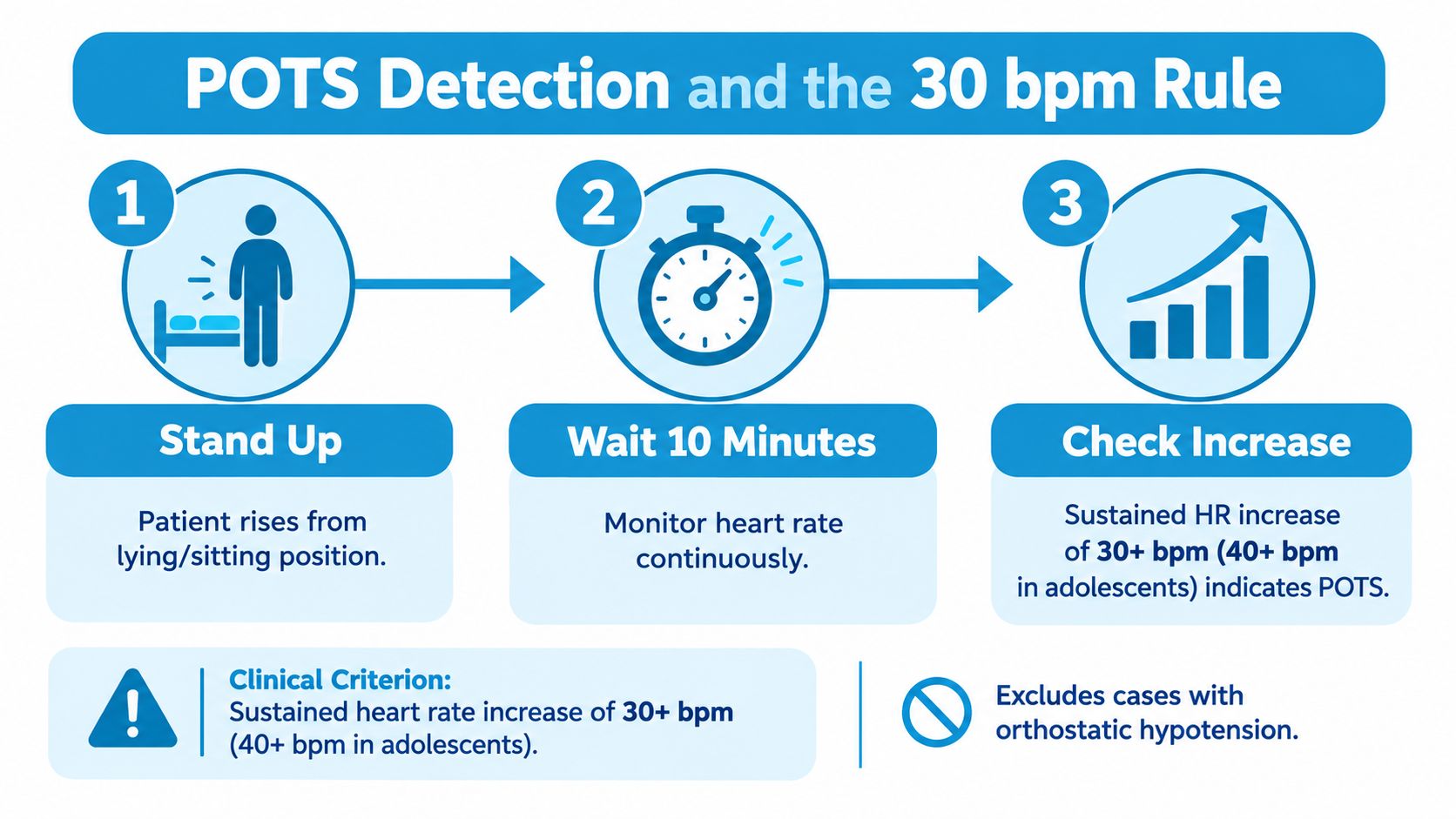
POTS detection begins with a change, not an absolute heart-rate number. In adults, the commonly used clinical criterion is a sustained increase of at least 30 beats per minute within 10 minutes of standing, without significant orthostatic hypotension. Adolescents generally use a 40-beats-per-minute threshold. The criterion also requires compatible chronic orthostatic symptoms and exclusion of other explanations.
That last part is easy to lose in an app notification. Dehydration, anemia, hyperthyroidism, medication effects, caffeine, alcohol, pain, panic, and exercise can all affect heart rate. A heart-rate rise alone can't establish POTS. The clinical context described in this consensus review of POTS diagnosis and management remains essential.
What the app can and can't detect
A useful detector should preserve the starting baseline, the peak, the time taken to rise, posture, and how long the increase remained present. Reporting only the maximum value throws away the part that makes the episode clinically interpretable.
Some apps use a five-minute detection window to identify and alert on a possible rise. That can be useful for early screening, but it's narrower than the full 10-minute clinical assessment window. The app should therefore label the result as a detected pattern, not a diagnosis. A five-minute alert can tell you to record what happens next. It can't replace a properly supervised evaluation.
The wrist sensor itself can also overestimate or underestimate a posture-related change. Loose contact, movement while standing, cold skin, and gaps in sampling can alter the trace. A good episode record pairs the heart-rate change with symptoms such as dizziness or palpitations, hydration, sleep, medications, time of day, and recent activity.
When an alert appears, sit safely if you feel unwell and note what happened before and after it. A clinician can do much more with "baseline rose, symptoms began, rate stayed high, and the event wasn't during exercise" than with a single unexplained peak. For a plain-language overview of the pattern, see how heart-rate increase relates to POTS.
HealthKit Permissions and Why Two Apps Disagree
Two apps can display different resting values without either one malfunctioning. They may have access to different samples, use different time windows, or apply different rules to sleep, workouts, recovery, and low-quality readings.
HealthKit separates read and write permissions by data type. An app may request permission to read heart-rate samples without permission to write data back. Users can also grant access to only a limited recent history when an app is first installed, so the initial baseline may be incomplete.
The same day through different filters
| Access mode | Sampling behavior | Typical baseline effect |
|---|---|---|
| On-demand reading | Uses samples available when the app is open or a measurement is requested | Can miss overnight and between-episode data |
| Background heart-rate access | Reads eligible samples collected while the watch is being worn | Usually provides a fuller longitudinal picture |
| Limited historical access | Starts with only the history the user has authorized | Can make the first baseline look unstable or unusually short |
| Filtered analysis | Excludes selected workouts, recovery periods, or weak samples | May produce a cleaner trend than a raw Health app view |
The watch's collection behavior can also change the available record. Apple says newer watch models can provide heart-rate readings every five seconds throughout the day, while older background readings are less frequent. Even when both apps read from the same HealthKit account, their available sample sets may differ because of device generation, permission state, background delivery, and processing rules. The HealthKit authorization documentation explains why access is controlled separately by data type.
Before trusting a displayed baseline, check:
- Read access: Heart Rate is enabled for the app.
- History access: The app can read the period you expect it to analyze.
- Write access: You know whether the app writes anything, rather than assuming read access works both ways.
- Related metrics: Heart-rate variability or recovery data may require separate permissions.
- Filtering rules: The app explains what it excludes and why.
- Sync status: The watch and iPhone have recently exchanged data.
For a practical explanation of connecting an app to Apple Health, review Apple Health integration. If two baselines still disagree, compare timestamps and raw sample availability before comparing the numbers themselves.
Setting Up a Heart Rate App on iPhone and Apple Watch
Start in the iPhone Health app, not inside the tracking app. Open the sharing or permissions area, select the heart-rate category, and allow the app to read the data it needs. Review related settings individually. Heart Rate supplies the samples used for trend analysis, while irregular-rhythm notifications and high-heart-rate alerts are separate system features with their own behavior.
Don't enable every permission automatically. Read-only access can be enough for an app that analyzes existing watch data. If the app requests permission to write, decide whether that serves a real purpose. The permission screen is also a useful moment to check whether historical access is limited.
Prepare the watch
Install the companion app on the paired watch if one is available. Turn on wrist detection, keep background app refresh enabled, and add the heart-rate complication if you want a quick way to see current readings. A complication can improve visibility, but it doesn't guarantee that every historical sample will be available to every app.
Wear the watch snugly enough to maintain contact without making it uncomfortable. Cold hands, movement, and a shifting band can all reduce signal quality. The first goal isn't to produce a perfect number. It's to confirm that the watch is collecting a usable stream.
Verify the handoff
Open the watch face and read the current pulse while sitting still. Then check the app's recent log and confirm that a corresponding sample appears with a plausible timestamp. If the values differ, don't keep refreshing until they match. First ask whether you're comparing a live reading with an average, a recent sample with a processed summary, or two measurements taken at different moments.
Check the next morning's record as well. An overnight trend is more informative than a successful setup screen. Look for a continuous period, reasonable timestamps, and clear labels for missing data or excluded activity.
iCloud sync can make history available across the user's devices within the configured account, but unpairing a watch can interrupt new collection and may affect which historical samples remain accessible through the connected device. Before unpairing, confirm that the iPhone has synchronized the data you need and that the app has retained its local or cloud-backed history.
For a detailed walkthrough of watch-based collection, see Apple Watch heart-rate tracking.
When to Trust a Reading and When to Verify
A single spike is a clue, not a verdict. The most common false triggers have ordinary explanations: a loose band creates motion artifact, caffeine or a medication changes timing, dehydration raises cardiovascular demand, and exercise keeps the heart rate high during recovery.
A 24-hour trend can help separate these possibilities. A spike that lines up with a workout may belong in a recovery record. A change that appears after caffeine may repeat at a predictable time. A reading that occurs during a loose-band episode may come with gaps or abrupt jumps. An unexplained rise that repeats while you're still and symptomatic deserves more attention than an isolated value surrounded by normal samples.
Use a simple verification routine
- Check the timestamp. Ask what you were doing, whether you had just stood up, and whether the sensor was secure.
- Count manually. Sit and count your pulse for a full minute, especially if the rhythm feels irregular or the wearable value seems surprising.
- Look for persistence. Check whether later readings remain elevated instead of reacting to the first alert.
- Compare with yourself. Your established pattern is more useful than a generic target applied without context.
- Record symptoms. Note dizziness, fainting, chest pain, shortness of breath, palpitations, weakness, or confusion.
A trustworthy alert should slow you down. Sit, breathe normally, verify the pulse, and decide what the pattern and symptoms require.
Seek urgent medical help for chest pain or pressure, severe shortness of breath, fainting, new neurological symptoms, severe weakness, confusion, or a rapidly worsening condition. A sustained or repeatedly high rate, recurrent palpitations, or a meaningful change after a medication adjustment warrants medical advice even when the app's value doesn't look dramatic.
Wearable accuracy is strongest at rest on average, but individual readings still have limits. A review of 38 validation studies involving 1,855 participants found pooled resting agreement near 0.21 beats per minute while the 95% limits of agreement were approximately -8.14 to +8.56 beats per minute, as reported in this systematic review of wearable heart-rate accuracy. That combination explains why repeated readings and context are safer than alarm-driven decisions.
Choosing the Right App for Your Situation
Choose the app around the question you need answered. Someone tracking general fitness may want a clean personal trend. Someone with palpitations may need automatic episode detection and symptom notes. Someone investigating orthostatic symptoms needs posture-aware records, exclusions for exercise, and an export that a clinician can review.
| Primary Goal | Top Priority | Secondary Priority | Acceptable Trade-Off |
|---|---|---|---|
| General trend tracking | Consistent baseline and readable history | Simple summaries and low setup effort | Fewer diagnostic-style alerts |
| Symptom monitoring | Automatic detection and configurable alerts | Context logging for symptoms and triggers | More setup and review |
| Orthostatic screening | Baseline, rise, duration, posture, and export | Workout exclusion and clinician-ready reports | Screening remains separate from diagnosis |
| Privacy-focused tracking | Minimal permissions and clear storage rules | On-device processing and deletion controls | Less cross-device convenience |
For clinical use, accuracy and longitudinal export matter more than decorative charts. You should be able to show when an episode occurred, what the starting and peak values were, how long the change lasted, and what symptoms or circumstances accompanied it. A polished graph without provenance is difficult to evaluate.
For symptom monitoring, automatic detection can reduce the burden of remembering to start a recording. Configurable alerts help you avoid notifications for every expected rise, especially after activity. The app should still show the rule it used and let you inspect the underlying episode rather than hiding the decision inside a score.
Privacy creates a real trade-off. A free app may fund itself through data practices you don't want, while a paid app may create subscription fatigue. Standalone tracking can feel simpler, but HealthKit integration may make existing history easier to use. Choose based on the data boundary and workflow you can sustain, not just the price shown on the download screen.
Cardiogram reads Apple Health heart-rate data through read-only access, analyzes it on device, organizes resting trends and detected tachycardic episodes, and provides context logging and exportable reports for clinical conversations. No consumer app diagnoses POTS, dysautonomia, arrhythmia, or any other condition. It organizes evidence so you and your doctor can spend less time reconstructing what happened and more time deciding what to do next.
If you want to turn Apple Watch heart-rate samples into organized resting trends, symptom-linked episodes, and clinician-ready summaries, visit Cardiogram. Use it alongside manual verification and medical care, especially when an alert is persistent, recurrent, or accompanied by concerning symptoms.