You feel your heart accelerate while standing in the kitchen, then settle before you can explain it to anyone. By the time you open the Apple Health app, the moment has passed, and the graph shows a few numbers without telling you whether you were upright, exercising, dehydrated, symptomatic, or recovering.
That's the central problem with using an iPhone heart rate monitor for POTS and dysautonomia. Collecting pulse data is relatively easy. Turning it into a reliable record of posture-related changes, symptom timing, duration, and everyday context is much harder. An Apple Watch paired with an iPhone can help, but only when you understand what the sensor measures, how often HealthKit receives samples, and which readings shouldn't count as autonomic episodes.
The Challenge of Tracking Dysautonomia on iPhone
A person with suspected POTS may notice a familiar sequence: sitting feels manageable, standing brings lightheadedness, the heart begins pounding, and concentration becomes difficult. The symptoms may improve after sitting or lying down, leaving little objective evidence for an appointment later.
A general fitness dashboard isn't designed around that experience. It may emphasize workouts, movement, or broad heart-rate summaries, while the clinically useful questions are different:
- What was the heart-rate baseline before standing?
- Did the rise persist, or was it a brief fluctuation?
- Was the person upright, walking, exercising, or recovering?
- Which symptoms occurred at the same time?
- Did sleep, hydration, salt intake, medication, or illness provide relevant context?
One high reading can't answer those questions. It's a timestamped estimate, not an episode record.
Why a graph isn't enough
Apple Health can store substantial health information, but its native presentation may require manual interpretation. A patient might see a sequence of readings and remember feeling unwell, yet still have to reconstruct the episode by comparing timestamps, symptoms, activity, and posture from memory.
That reconstruction is vulnerable to gaps. If you're dizzy, you're unlikely to record every detail neatly. You may remember the peak but not the baseline, or the symptom but not how long the rise lasted. A monitoring setup should reduce that burden rather than make the patient act as a full-time data clerk.
Practical rule: A useful record connects heart rate with time, activity, symptoms, and recovery. A number without context is only a clue.
The blind spot in passive monitoring
Dysautonomia often appears in ordinary transitions, not only during formal exercise. Standing from a chair, waiting in a queue, showering, or preparing food may be more relevant than a workout session. Those situations are difficult to capture with manual checks because the event may start before the phone is accessible and fade before a measurement is taken.
The right iPhone setup therefore needs two capabilities at once. It must collect passively enough to catch unpredictable changes, and it must filter context well enough not to label every exertional rise as pathological. That balance matters more than a polished chart or a large collection of raw readings.
Understanding Apple Watch Sensor Accuracy and Limits
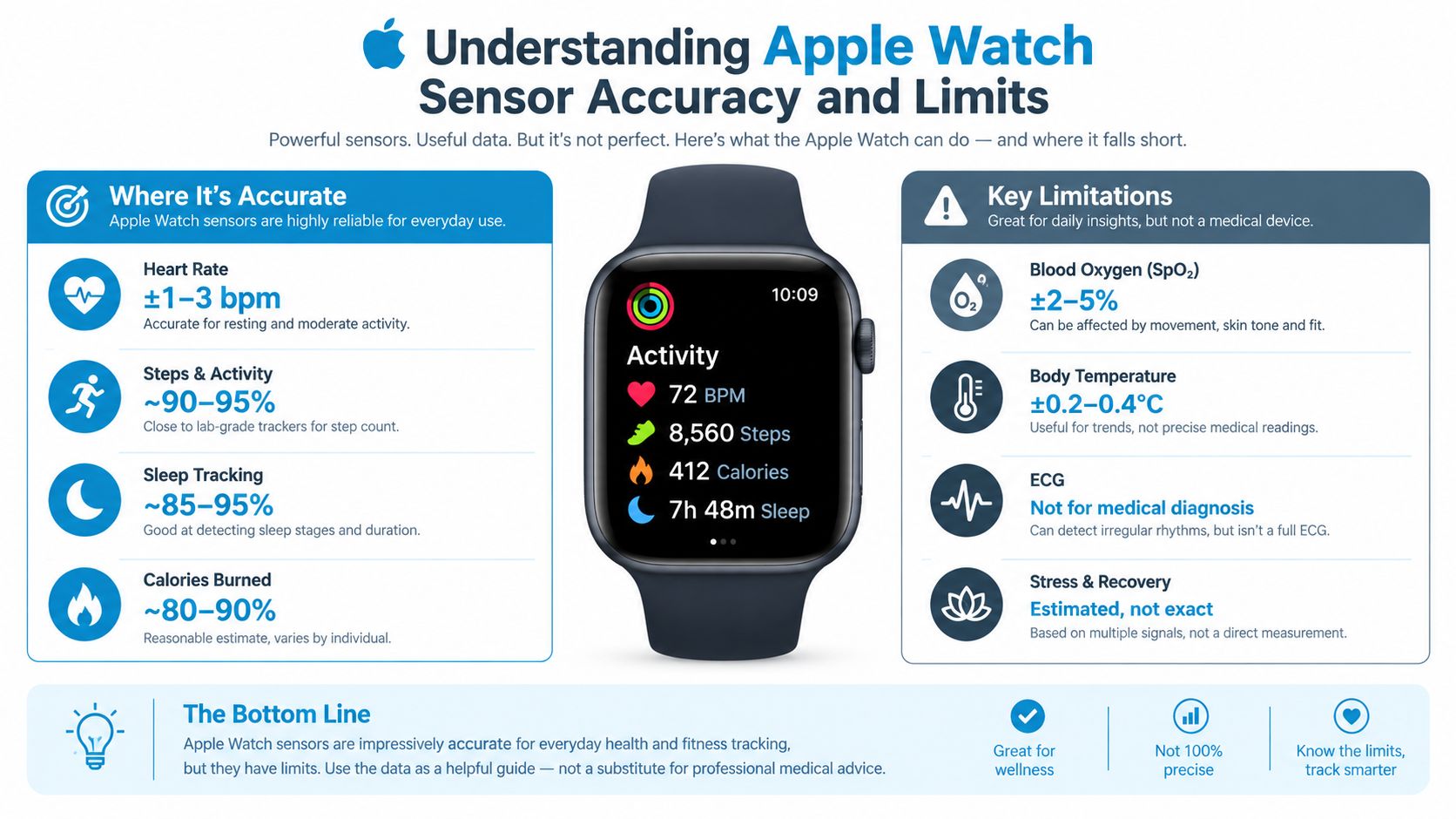
Apple Watch heart-rate data comes from photoplethysmography, commonly called PPG. The sensor estimates pulse by detecting blood-volume changes at the wrist. That makes it practical for ongoing monitoring, but it doesn't turn the watch into a continuous ECG.
The evidence supports a measured interpretation. A 2019 peer-reviewed validation study compared Apple Watch Series 3 readings with ECG over 24 hours. It found a mean difference of -1.80 beats per minute, a mean absolute error of 4.72 bpm, and a mean absolute percentage error of 5.86%. The study reported 95% mean agreement with ECG across the recording period, while sitting produced a higher mean absolute percentage error of 7.21%. The investigators concluded that the Apple Watch and another consumer wearable generally achieved acceptable heart-rate accuracy, defined in that study as less than ±10%, across the full period and most activity conditions. See the peer-reviewed Apple Watch validation study for the full methodology and results.
Average agreement versus individual readings
A newer synthesis gives a broader picture. A 2025 systematic review and meta-analysis combined 82 studies, 14 Apple Watch health metrics, and 430,052 participants. For heart rate, 38 studies involving 1,855 participants assessed models through Series 9 and Ultra 2. Apple Watch underestimated heart rate by only 0.27 bpm on average, with a 95% confidence interval from -0.72 to 0.17 bpm. Yet individual limits of agreement ranged from -7.19 to 6.64 bpm, showing that a small average bias doesn't mean every reading matches a reference measurement closely. The systematic review and meta-analysis explains why population-level accuracy and personal-reading variability must be considered separately.
For POTS tracking, this distinction changes how you interpret a record. A repeated rise over several minutes, occurring in a consistent context and accompanied by symptoms, is more informative than one surprising value. Wearable data can support pattern detection and clinical discussion, but it shouldn't be treated as diagnostic ECG evidence.
Sampling density changes the question you can answer
The Apple Watch may display high-frequency background readings as often as every 5 seconds, while background samples written to Apple Health and HealthKit may be recorded approximately every 30 seconds to reduce device-memory use. That means a retrospective iPhone timeline can help identify multi-minute changes, such as a sustained rise after standing, but it isn't beat-to-beat telemetry. The Apple heart-rate accuracy document describes this resolution trade-off.
Workout sessions may provide denser data than ordinary background monitoring. Algorithms should therefore identify workouts and recovery periods explicitly, rather than treating their readings as equivalent to non-exertional monitoring. Preserve timestamps, report gaps, and avoid filling missing intervals with invented values.
Comparing iPhone Heart Rate Monitoring Options
There are three practical routes for people who want an iPhone-based monitoring system: use the native Apple Health record, add a Bluetooth Low Energy chest strap, or use a specialized HealthKit analysis app. None is universally superior. Each solves a different problem.
| Monitoring Method | Data Density | 24/7 Wearability | Context Filtering | Clinical Reporting |
|---|---|---|---|---|
| Native Apple Health | Passive background history, with gaps and variable sampling | High, when paired with a wearable | Limited manual interpretation | Basic history and sharing |
| Bluetooth chest strap | Dense pulse data during active use | Low for continuous everyday wear | Depends on the app and session labels | Useful raw session data, often needs formatting |
| Specialized HealthKit analysis app | Uses available Apple Health samples and organizes them into episodes and trends | High, because it can use existing watch data | Can apply activity and recovery rules, depending on the app | May provide structured summaries and exports |
Native Apple Health
The native route has the lowest setup burden. It uses the data already collected and keeps the patient within a familiar Apple ecosystem. For broad historical review, that simplicity is valuable.
The limitation is interpretation. Native graphs don't automatically know whether a rise followed standing, exercise, poor sleep, or anxiety. Patients may need to annotate events manually and assemble the clinical story themselves.
Bluetooth chest straps
A chest strap can be useful when the question requires dense, moment-by-moment pulse data. It's particularly practical for a controlled standing test, a short protocol, or a specific event when you can start and stop a recording deliberately.
It's less convenient for unpredictable symptoms throughout the day. Wearing and maintaining another sensor can become burdensome, and a short recording won't capture what happens when symptoms begin during an ordinary task.
Specialized HealthKit analysis
A dedicated analysis layer can organize existing Apple Health samples without requiring another sensor. The trade-off is that the app can't create detail that HealthKit never received. Its value comes from applying consistent rules, preserving context, and turning scattered readings into a reviewable timeline.
For a broader discussion of how wearable data can be used for longitudinal review, see this guide to wearable heart monitoring. The practical choice is usually determined by the question you're trying to answer. Use denser active-session hardware for controlled measurements, and passive watch data for discovering everyday patterns.
Transforming Raw Data into Clinically Useful Episodes
A heart-rate value becomes clinically useful only after you attach meaning to it. For suspected orthostatic tachycardia, that means recording the baseline, the rise, the duration, the circumstances, and the symptoms instead of saving the peak alone.
A sensible processing pipeline starts with the raw HealthKit sample and ends with a structured episode that a patient and clinician can review. The system should state its rule clearly, preserve source timestamps, and distinguish detected patterns from medical diagnoses.
Step one is defining the detection rule
A criterion-referenced detector can flag a 30 bpm or greater rise within 5 minutes, then record the baseline, peak, sustained duration, and time of occurrence. That criterion can help identify patterns for discussion, but it doesn't establish POTS by itself. A living systematic review notes that a reported 30 bpm increase should be treated as pattern discovery rather than standalone diagnosis without standardized clinical assessment. Read the living systematic review on Apple Watch health measurements for the evidence and limitations.
The rule matters because vague alerts create vague records. “Heart rate was high” is difficult to compare across days. “A sustained rise followed a logged standing transition, with dizziness beginning during the rise” is much more useful.
Step two is separating exertion from orthostatic stress
Workout and recovery intervals should be excluded from non-exertional episode counts. A normal exercise response can look like tachycardia if the algorithm ignores activity context, and post-workout recovery can remain raised after the exercise has stopped.
A practical workflow should:
- Identify exercise windows from HealthKit activity records.
- Exclude workout and recovery periods from orthostatic episode totals.
- Preserve excluded intervals separately, so they aren't mistaken for missing data.
- Report sampling gaps rather than interpolating them as real measurements.
HealthKit background readings may arrive approximately every 30 seconds, so the resulting timeline is appropriate for multi-minute sustained changes, not beat-to-beat analysis. A detailed approach to health trend analysis can help patients understand why duration and sampling gaps belong in the report.
Step three is adding the human record
Symptoms supply the meaning that sensors can't provide. Log dizziness, palpitations, fatigue, brain fog, hydration, salt intake, sleep, medication timing, posture, and recovery when possible. You don't need a perfect diary. Consistent timestamps around the most important events are more useful than lengthy notes written days later.
Over time, the combined record can reveal whether episodes cluster around particular routines or conditions. Treat those patterns as prompts for clinical discussion, not as proof that one trigger caused every event.
Privacy and On-Device Analysis for Health Data
Continuous heart-rate history is sensitive. It can reveal sleep patterns, daily routines, symptoms, medication timing, and periods of reduced activity. A monitoring plan should therefore assess not only whether an app produces useful episodes, but also where the underlying data is processed and stored.
Read-only access reduces unnecessary exposure
A read-only HealthKit connection lets an application analyze existing Apple Health records without writing new health values back into the store. That separation is useful because the app can focus on interpretation while leaving the original health record under the user's control.
Patients should also ask whether processing occurs on the iPhone or on remote servers. On-device analysis keeps the computation within the personal device environment, while iCloud-based synchronization can support continuity across the user's own devices without requiring a separate health-data repository.
Privacy should be a product feature
Review the permission screen and privacy policy before granting access. Look for clear answers about:
- Data movement, including whether raw heart-rate history leaves the phone.
- Storage location, including whether a service retains medical timelines remotely.
- Write permissions, especially whether the app can alter HealthKit records.
- Export and deletion, so you can retrieve or remove your information.
- Account boundaries, including which devices can access synchronized records.
The health data privacy guide offers a useful framework for evaluating these questions in a wearable-monitoring context.
Privacy doesn't replace clinical usefulness, and accuracy doesn't excuse opaque data handling. The strongest setup respects both. It converts health records into understandable episodes while minimizing unnecessary copies of personal information.
Choosing the Right Setup for Your Symptom Profile
Your monitoring needs depend on what happens during symptoms and what you need from the data. Someone with sudden presyncope has a different priority from someone trying to understand a gradual change in baseline over several weeks.
| Your main need | Prioritize | Avoid relying on |
|---|---|---|
| Immediate awareness during symptoms | Phone alerts, readable episode timestamps, and quick symptom logging | A graph you must inspect manually later |
| Longitudinal pattern discovery | Consistent passive collection, baseline trends, and heatmaps | Isolated spot checks |
| Controlled standing assessment | Dense active-session recording and careful posture notes | Workout data mixed into daily episode totals |
| Medication or treatment discussion | Time-linked episodes, symptom context, and exportable reports | Unlabeled screenshots |
| Specialist preparation | Explicit criteria, exclusions, gaps, and summary trends | A claim that a wearable has diagnosed the condition |
If symptoms are frequent and disabling
Prioritize an alerting workflow that can notify you while an event is developing. The alert shouldn't be treated as an emergency verdict. Its role is to prompt you to note posture, symptoms, activity, and recovery while the details are fresh.
Make sure the system distinguishes exercise from non-exertional changes. Without that filter, frequent workouts or active household tasks can overwhelm the episode feed with findings that don't answer your clinical question.
If your focus is trends
Choose a setup that preserves historical data and presents it in a way you can scan across days. Resting-heart-rate trends, weekly summaries, and episode heatmaps can make recurring timing easier to spot than a long list of individual samples.
For people tracking sleep disruption, hydration, salt intake, or medication changes, context logging matters as much as the graph. A trend without annotations may show that something changed, but not what was happening when it changed.
If you're preparing for clinical testing
Keep the setup stable rather than changing sensors repeatedly. Record what device produced the data, whether readings came from background monitoring or a workout session, and which intervals were excluded.
A specialized HealthKit analysis app such as Cardiogram can read Apple Health heart-rate data, identify tachycardic episodes, attach symptoms and triggers, and produce summaries for review. It can be one component of a broader monitoring plan, not a replacement for standardized autonomic testing or professional assessment.
Presenting iPhone Data to Your Autonomic Specialist
A clinician doesn't need a mountain of screenshots. They need a concise explanation of how the data was collected, how episodes were identified, and what happened around the readings.
Start with the method. State that the record contains wearable PPG heart-rate data from Apple Health, not continuous ECG. Note whether the data came from background monitoring or a workout, and identify how exercise and recovery intervals were handled.
Build a report around questions
A useful report should answer:
- What changed? Show baseline, peak, rise, and sustained duration.
- When did it happen? Include dates and timestamps.
- What was the context? Record posture, activity, sleep, hydration, salt, and medication timing when known.
- What did you feel? Link dizziness, palpitations, fatigue, brain fog, or presyncope to the episode.
- How reliable is the timeline? Include sampling gaps and avoid presenting interpolated values as measurements.
A PDF summary is often easier to review than a scrolling phone screen. It should state the detection criterion used, identify exclusions, summarize recurring patterns, and place symptoms alongside the relevant episodes.
Challenge the meaning of a threshold
A detected rise that meets a screening rule can be important evidence for discussion, but it isn't a diagnosis. The living review cited earlier emphasizes that individual wearable variability remains meaningful even when average bias is close to zero. Standardized standing measurements, clinical history, examination, and appropriate testing still determine diagnosis.
The best wearable report doesn't say, “My watch proved I have POTS.” It says, “Here is a repeated, time-stamped pattern, here is what I felt, and here is how the record was produced.”
Bring the report, your medication list, and a short description of your usual symptom pattern to the appointment. Ask the specialist which measurements should be repeated under standardized conditions and which findings require a different form of monitoring.
Cardiogram analyzes Apple Health heart-rate history for tachycardic episodes, baseline changes, symptoms, triggers, and longer-term trends, while excluding workout and recovery periods from relevant episode counts. If you want a structured iPhone record and a clinician-ready summary built from your existing Apple Watch data, visit Cardiogram and review how it fits your monitoring goals.