No, Apple Watch doesn't measure blood pressure in mmHg, but yes, it can issue a probabilistic hypertension alert based on a 30-day pattern window. That still isn't what someone with dizziness after standing needs, because orthostatic symptoms require direct blood-pressure readings and carefully tracked heart-rate changes during position shifts.
You may be looking at your wrist after a notification appears and wondering why there's no familiar pair of numbers, such as a systolic reading over a diastolic reading. The answer isn't that the feature is broken or hidden in a different menu. Apple Watch provides a screening alert for possible hypertension, not a cuff-style blood-pressure measurement.
That distinction matters in two very different situations. Someone who feels perfectly well may use the alert as a prompt to arrange a proper check for previously undiagnosed high blood pressure. Someone who becomes lightheaded, weak, or unusually tachycardic after standing needs a different monitoring strategy, because a long-window hypertension alert can't capture the rapid physiological change happening in that moment.
What Apple Watch Can Do for Blood Pressure
A hypertension notification can send you to the Health app expecting two familiar values. Instead, you see an alert about possible high blood pressure. The watch does not generate a blood-pressure number, because it is detecting a pattern rather than measuring pressure in the artery.
Apple says the feature analyzes photoplethysmography, or PPG, data collected across a 30-day evaluation period. It can issue a probabilistic alert when that pattern suggests hypertension. The feature is intended for adults 22 and older who have not previously been diagnosed with hypertension. Apple also states that it does not replace traditional diagnosis or ongoing blood-pressure surveillance. The boundaries are outlined in Apple's explanation of hypertension notifications.
Screening is different from measuring
A traditional upper-arm cuff briefly compresses an artery and reports two values in mmHg: systolic pressure and diastolic pressure. The watch's optical sensor collects pulse-related signals at the wrist. Software then examines those signals for a pattern associated with persistently high pressure.
The output is a prompt to investigate, not a measurement for adjusting medication. It is useful for raising a question about chronic hypertension in someone who may not realize it is present.
A notification cannot answer what your pressure is after a stressful meeting, during dizziness, or immediately after standing. Those moments require readings taken at the relevant time, because symptoms can reflect rapid changes that a long-term screening pattern will not show.
Practical rule: Treat a hypertension notification as a reason to confirm your pressure with a validated cuff, never as a diagnosis.
People already diagnosed with hypertension should continue using the measurements their clinician relies on for management. A watch alert cannot replace that record. For suspected orthostatic intolerance, the gap is more specific: it cannot show whether pressure dropped after standing, whether the pulse rose quickly, or how either change matched your symptoms.
The watch can open the right clinical question. A cuff supplies the numbers needed to investigate it.
How the Hypertension Alert Works
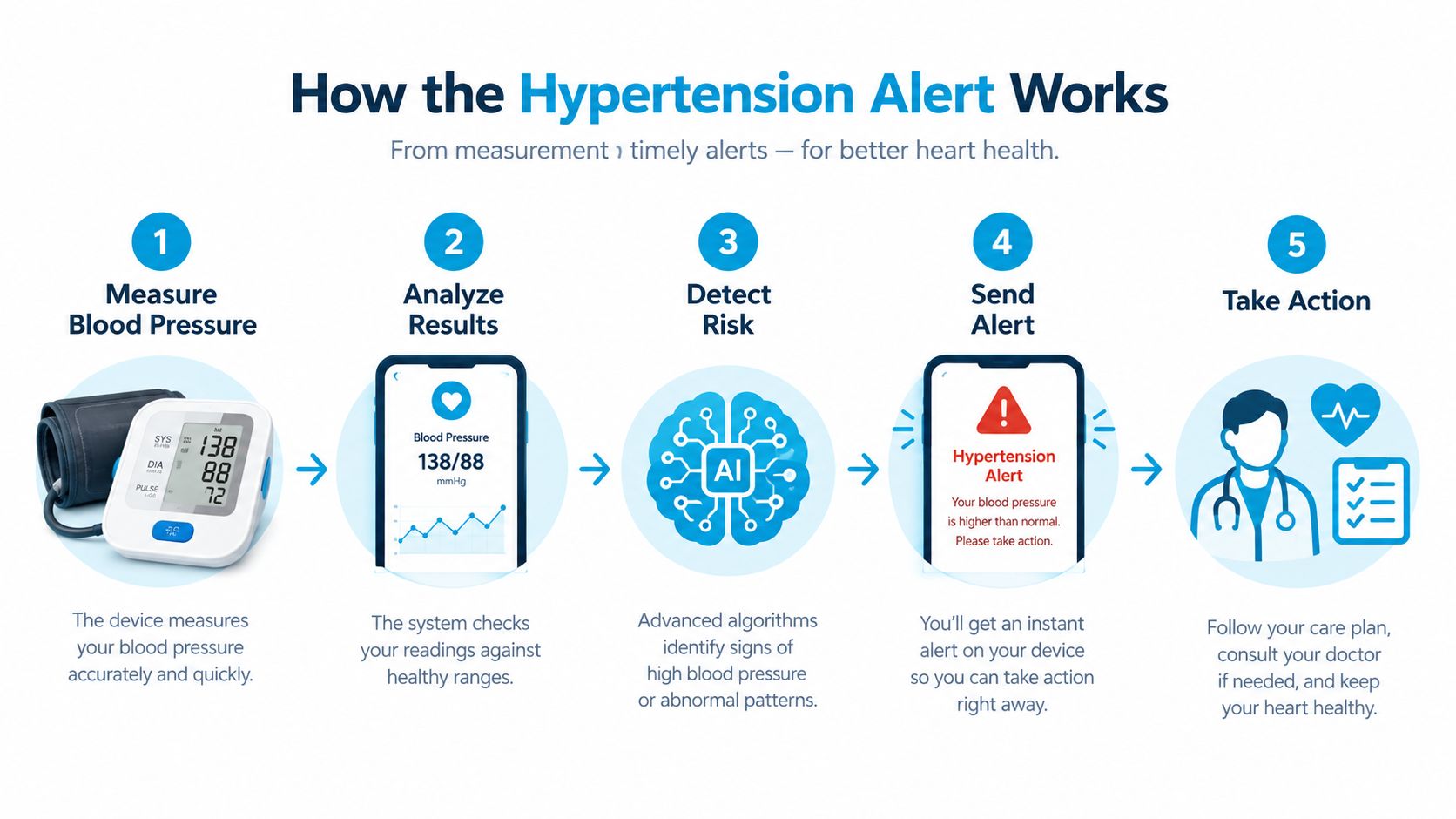
You finish a busy day and wonder whether your blood pressure has been running high. The watch may help raise that question, but it does not place an inflatable cuff around your arm or report a pressure reading.
Its PPG sensor uses light to detect changes in blood volume with each heartbeat. These optical pulse signals show how the pulse behaves over time. They do not directly measure the force pressing against an artery wall, which is what a cuff measures.
Apple's system uses pattern recognition. During ordinary wear, it gathers pulse signals and examines the broader pattern across about 30 days. If the combined pattern suggests possible hypertension, the watch may send a notification. The feature's intended role is screening, not replacing a cuff measurement or confirming a diagnosis.
Why a long window changes the question
A cuff asks, “What is your blood pressure during this measurement?” The watch asks a different question: “Do your repeated pulse patterns resemble a pattern associated with possible chronic hypertension?”
That distinction explains why one pulse spike does not equal a hypertension alert. Activity, stress, illness, sleep, hydration, and poor sensor contact can all change pulse signals. A longer observation window provides more context, while making the feature unsuitable for immediate feedback.
The intended population creates another boundary. The alert is designed for adults who have not previously received a hypertension diagnosis. Someone already monitoring or treating high blood pressure should not interpret a quiet watch as proof that treatment is working.
What the watch cannot infer
The watch cannot provide a systolic value, a diastolic value, or the pressure difference between lying down and standing. It also cannot show whether pressure dropped after standing, whether pulse rose quickly, or how either change matched dizziness or other symptoms.
Use the watch as a passive screening layer. Use a cuff when the question requires an actual number, especially during symptoms or clinical follow-up.
Accuracy, Sensitivity, and Clinical Validation
The most useful way to judge a screening alert is to separate sensitivity from specificity. Sensitivity asks how often the system identifies people who have the condition. Specificity asks how often it avoids alerting people who don't have it.
A published analysis of smartwatch blood-pressure screening cited a study with more than 2,000 participants. In that study, Apple Watch correctly identified 214 of 585 people whose blood pressure was at or above 130/80 mmHg, producing 41.2% sensitivity and 92.3% specificity. These figures are reported in the study materials available through the published smartwatch hypertension screening analysis.
What those figures mean in everyday use
A specificity of 92.3% means the alert generally avoids incorrectly flagging people who don't meet the study's hypertension threshold. That makes an alert worth taking seriously as a prompt for confirmation.
The 41.2% sensitivity tells the other half of the story. Many people with high blood pressure won't receive an alert. A screening tool with that pattern can help rule in a concern when it flags, but it shouldn't be used to rule out hypertension when it stays quiet. Independent clinical coverage describes the same limitation, including sensitivity around 41% overall and about 54% in stage 2 hypertension, with specificity around 92%, in its discussion of smartwatch hypertension screening.
Age also changes how a notification shifts probability. Recent reporting on a February 2026 JAMA study noted that, among adults under 30, an alert raised the probability of hypertension from 14% to 47%. Among adults 60 and older, it rose from 45% to 81%. The same reporting emphasizes that no alert leaves meaningful residual risk, particularly in older adults, so a quiet watch isn't an all-clear result. See the age-specific analysis of Apple Watch hypertension alerts.
For readers interested in how wearable heart signals are collected and interpreted more broadly, how the heart monitor works provides useful background. The central clinical judgment remains unchanged: an alert deserves confirmation, while no alert doesn't overrule symptoms, risk factors, or a clinician's concern.
Setting Up and Interpreting the Notification
Before relying on the feature, confirm that your watch and software support it, then review Apple's eligibility requirements. The feature is intended for adults 22 and older without a previous hypertension diagnosis, so it isn't a replacement for an established monitoring plan.
A sensible setup routine
- Check eligibility first. Make sure the feature is available for your device, region, and software version, then read the on-screen instructions rather than assuming the watch provides direct readings.
- Wear the watch consistently. The system needs a broad sample of ordinary pulse data across the evaluation period. Gaps can reduce the context available to the pattern analysis.
- Keep your routine honest. Don't change your behavior just to produce cleaner watch data. Ordinary sleep, activity, rest, and daily variation are part of the signal the system is designed to observe.
- Plan confirmation in advance. If an alert appears, know where you'll obtain a validated cuff measurement and how you'll share the result with a healthcare professional.
The first phase isn't a series of instant tests. Apple analyzes the accumulated data over 30 days, so you shouldn't expect a notification immediately after a single unusual pulse event. That long window also means the result speaks more to a possible sustained pattern than to what your body is doing during a particular episode.
Read the alert without panic
An alert isn't proof that you have hypertension, but it isn't something to dismiss either. Arrange a proper blood-pressure check, record the circumstances, and discuss the result with a clinician. Don't start, stop, or change medication based solely on a wearable notification.
A no-alert result needs the same calm interpretation. If you have symptoms, a strong family history, or previous borderline readings, continue the monitoring plan recommended by your clinician. Heart-rate notifications can provide additional context, and Apple Watch heart-rate alerts may help you understand unusual pulse patterns, but they still don't produce the cuff measurements needed for blood-pressure diagnosis.
Alternatives for Direct Blood Pressure Monitoring
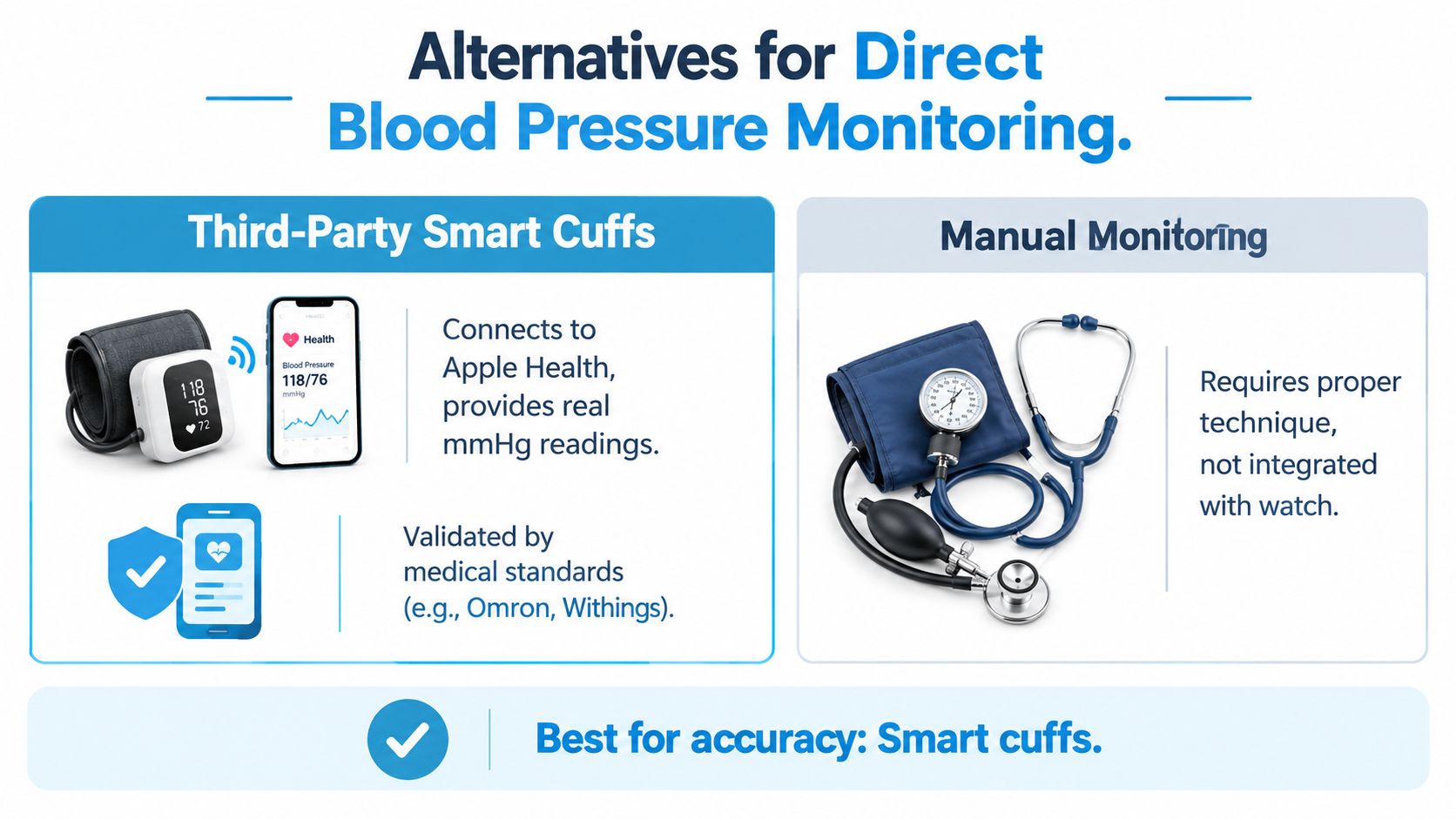
If your question is, “What is my blood pressure right now?” you need a device that produces a calibrated mmHg reading. The most practical workaround is to use a validated upper-arm cuff and, where supported, connect its readings to your phone's health record.
Match the tool to the job
| Your health question | More appropriate approach | Why |
|---|---|---|
| Could I have previously undiagnosed chronic hypertension? | Apple Watch notification plus cuff confirmation | The watch can raise a screening prompt, while the cuff provides the actual values. |
| What are my systolic and diastolic readings at home? | Validated upper-arm monitor | It directly answers the numerical question. |
| What happens to my pressure after standing? | Structured cuff measurements during position changes | A long-term watch alert cannot capture an immediate pressure change. |
| How do my readings change across days? | Cuff paired with a logging or health-record app | Stored readings create a reviewable history for appointments. |
What to look for in a cuff
Choose an upper-arm monitor validated against recognized medical standards, rather than assuming every connected device is equally suitable. The cuff should fit correctly, store readings reliably, and make it easy to review dates, times, and values. Bluetooth connectivity is convenient, but connectivity doesn't make an unvalidated device clinically trustworthy.
Technique matters as much as the hardware. Sit, support your arm, keep the cuff positioned as instructed, and avoid interpreting one isolated result without context. Your clinician can tell you how often to measure and whether readings should be taken at particular times.
A connected cuff can place readings beside heart-rate, sleep, and activity data in Apple Health. That creates a useful combined record, but it doesn't turn the Apple Watch into a blood-pressure sensor. The watch remains the pattern-screening layer, while the cuff supplies the direct measurement.
For people tracking fluctuating symptoms, exportable reports can be valuable. A clear record showing readings, timing, symptoms, and relevant context gives a clinician something more useful than a memory of a particularly bad day.
Tracking Orthostatic Symptoms with Heart Rate Data
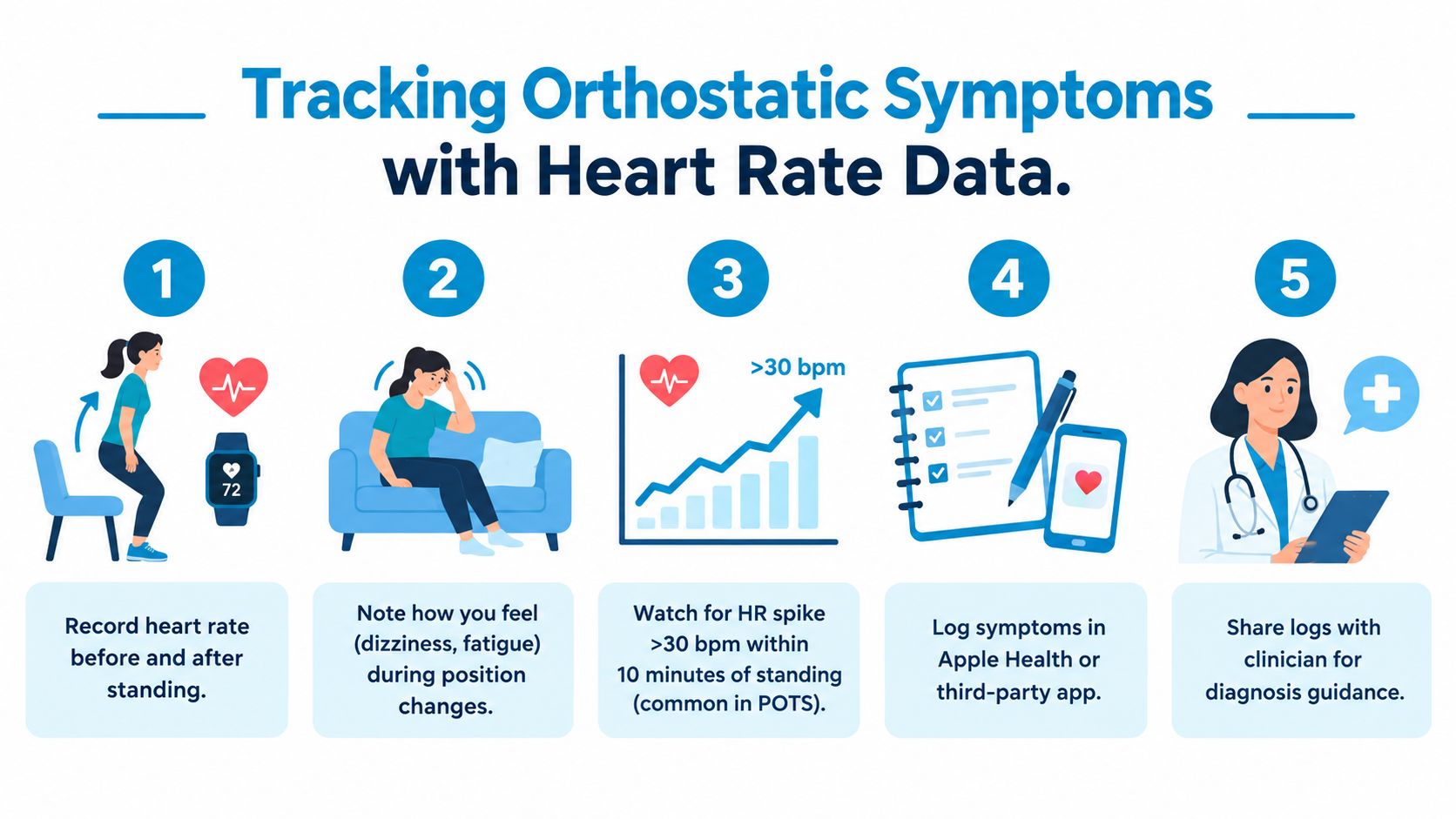
Many searches for blood pressure with Apple Watch come from people who feel unwell after standing. They may experience dizziness, palpitations, fatigue, weakness, or a noticeable racing heartbeat during the transition from sitting or lying down to standing.
For that problem, the watch's heart-rate history is often more relevant than its hypertension notification. Apple states that the hypertension feature isn't a replacement for blood-pressure surveillance, and clinical discussion also cautions that it can't substitute for systolic and diastolic measurement when evaluating orthostatic or tachycardic events. The limitation is described in this clinical review of Apple Watch blood-pressure functionality.
Build a repeatable observation
A useful log links position, pulse, symptoms, and context. Begin with a calm baseline while seated or lying down, note how you feel, then record what happens after standing. The exact timing and method should follow your clinician's instructions, especially if standing makes you feel faint.
Include context that can change the result:
- Position and timing: Record whether you were lying, seated, or standing, along with the time of day.
- Symptoms: Note dizziness, palpitations, fatigue, brain fog, shortness of breath, or weakness when they occur.
- Possible triggers: Log hydration, salt intake, sleep quality, recent illness, heat, meals, and medication timing.
- Activity boundaries: Separate ordinary posture changes from exercise and recovery so your clinician can interpret the pattern accurately.
- Blood-pressure values: If you have a validated cuff, record the actual reading alongside the pulse response.
A single heart-rate rise doesn't diagnose POTS, dysautonomia, or another condition. Repeated observations can still help a clinician decide what evaluation is appropriate, particularly when the log shows a consistent relationship between standing, symptoms, and pulse behavior.
Heart-rate data can document what happened. It can't explain why it happened.
Turn watch data into a clinical conversation
Raw graphs are difficult to interpret during a short appointment. A concise summary is more useful: when episodes occurred, how long they lasted, what you were doing, which symptoms appeared, and whether hydration, sleep, medication, or meals seemed relevant.
Cardiogram can import heart-rate and blood-pressure readings stored in Apple Health, organize tachycardic episodes and symptom context, and produce clinician-ready reports. It's one option for people who want structured longitudinal records, but it doesn't replace a cuff, diagnostic testing, or medical judgment.
The aim isn't to chase a particular watch number. It's to give your clinician a reliable account of the pattern your body is producing.
When to Seek Clinical Evaluation and Next Steps
Use a simple decision rule. If you want to know whether your pressure is high, use a validated cuff. If your watch sends a hypertension alert, confirm it clinically. If you feel dizzy or tachycardic after standing, log the posture change, heart-rate response, symptoms, and, when advised, cuff readings.
Seek help for the pattern, not just the notification
Arrange clinical evaluation when symptoms are persistent, recurrent, worsening, or interfering with ordinary activity. A notification also deserves follow-up when you have known cardiovascular risk factors, a history of borderline readings, or concerns that continue even without an alert.
Seek urgent medical care for severe or sudden symptoms, such as chest pain, serious breathing difficulty, fainting, new neurological changes, or a feeling that you may be in immediate danger. A watch notification shouldn't delay emergency assessment.
Prepare useful information
Before an appointment, gather:
- The notification details: Save the date and wording of any hypertension alert.
- Cuff readings: Include the values, time, position, and circumstances surrounding each measurement.
- Symptom notes: Mark dizziness, palpitations, fatigue, weakness, and what you were doing when they appeared.
- Medication and lifestyle context: Record relevant medication timing, sleep disruption, illness, hydration, and activity.
- Questions: Ask whether you need repeated home measurements, orthostatic testing, medication review, or additional evaluation.
Your clinician may also discuss habits that support cardiovascular health, including dietary patterns. Cardiogram's guide to the Mediterranean diet for high blood pressure can provide general background, but lifestyle advice should fit your medical history and treatment plan.
The full picture is straightforward. Apple Watch hypertension notifications can start a conversation about possible chronic high blood pressure, but they don't provide the blood-pressure number. A validated cuff fills that gap, while structured heart-rate and symptom logs are more appropriate for orthostatic complaints. Use each data source for the question it can answer.
Cardiogram helps turn Apple Watch heart-rate data into organized episodes, symptom context, trends, and clinician-ready reports, while Apple Health-compatible cuff readings can sit alongside that history. Visit Cardiogram to explore a clearer way to prepare your wearable and blood-pressure data for your next appointment.