You're in a meeting when your Apple Watch taps your wrist: high heart rate detected. You haven't exercised, you're sitting still, and suddenly a simple number feels like a diagnosis. It isn't. The alert is a screening signal, and its value depends on what you were doing, what you felt, and whether the pattern repeats.
An Apple Watch heart rate alert can help you notice tachycardia, low heart rate, or a rhythm pattern that deserves follow-up. It can also misread motion, miss events during activity, or create anxiety when you treat one notification as a verdict. The right approach is practical: understand the trigger, check the context, record the episode, and escalate based on symptoms and repetition.
What the Apple Watch Heart Rate Alert Actually Does
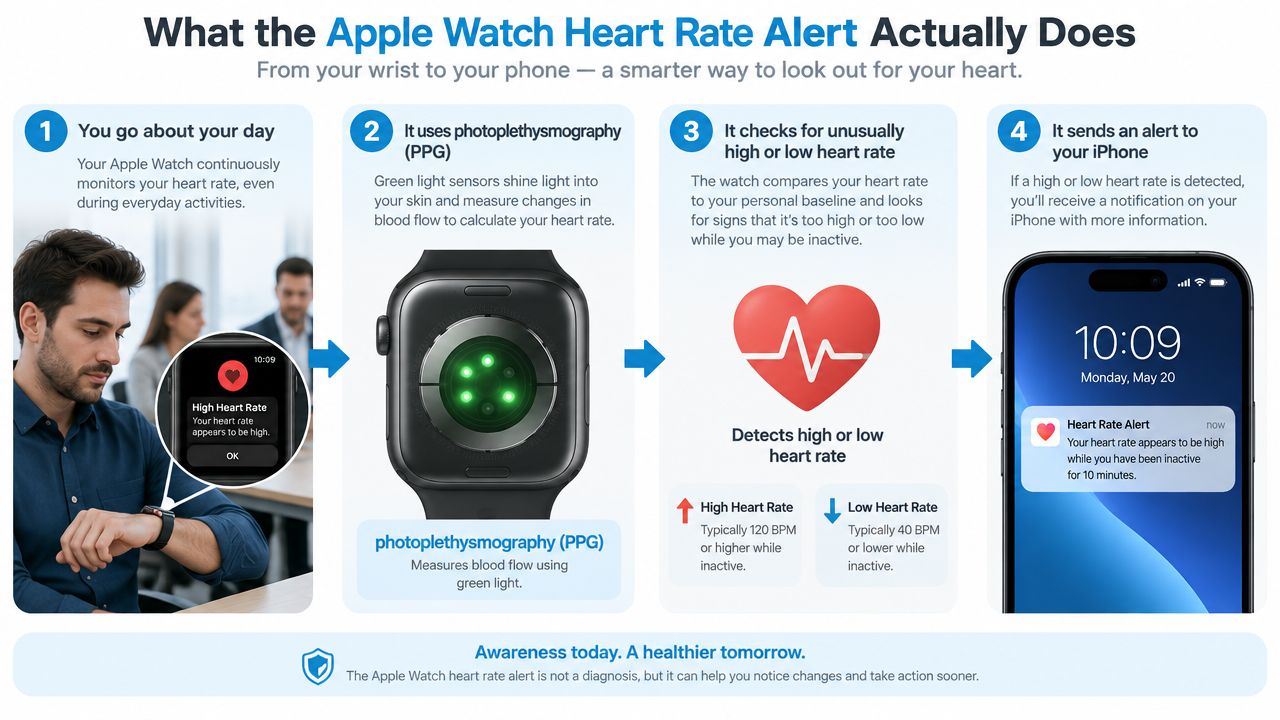
The Apple Watch measures pulse with photoplethysmography, or PPG, using an optical sensor against your wrist. Light-based readings estimate changes in blood flow, so the watch tracks pulse rather than recording a clinical electrocardiogram. That distinction should shape how you interpret every notification. The watch can flag an unusual pattern, but it cannot identify the cause on its own.
The built-in heart rate feature uses thresholds. Apple's health documentation lists default high and low notification thresholds of 120 beats per minute and 40 beats per minute. These alerts are designed for periods when you appear inactive, so a high reading during an expected workout should not be treated the same way as a high reading while sitting or lying down. For a clearer explanation of the sensor technology, read this guide to how heart monitors work.
The three signals are not interchangeable
A high heart rate notification means the watch detected a rate at or above your chosen threshold while you appeared inactive. A low notification flags the opposite pattern. Neither one diagnoses a disease. A high rate can follow standing, dehydration, fever, stress, stimulant use, autonomic symptoms, or an arrhythmia. For POTS, dysautonomia, or unexplained tachycardia, inactivity context matters because standing still may be physiologically demanding even when the watch does not classify it as exercise.
The irregular rhythm notification is separate. Apple's FDA-cleared system uses optical pulse data to identify episodes suggestive of atrial fibrillation. It checks across five rhythm checks over at least 65 minutes and notifies you when the pattern remains concerning. The feature was cleared by the FDA in September 2018 and became publicly available on Apple Watch Series 1 or later in December 2018, according to the FDA decision summary.
Practical rule: Treat a heart-rate notification as a prompt to investigate the episode, not proof that you have an arrhythmia.
One alert calls for context. Repeated alerts deserve a record of rate, posture, symptoms, sleep, and activity, then a clinician discussion when the pattern persists or symptoms are significant.
Turning On and Customizing Your Heart Rate Notifications
A quiet afternoon at your desk can still produce a meaningful alert, especially if standing, dehydration, medication, or autonomic symptoms push your rate upward. Set up notifications before trying to interpret them. On your iPhone, open the Health app, select Browse, choose Heart, then open High Heart Rate Notifications or Low Heart Rate Notifications. On supported newer watches, high thresholds range from 100 to 150 bpm, and low thresholds range from 40 to 50 bpm, according to Apple's heart-rate notification guidance. The options depend on your watch and software version.
You can also change these settings in the Heart Rate app on the watch. I recommend enabling both high and low notifications on the watch itself. The wrist is where the signal appears, particularly when your iPhone is elsewhere.
Choose thresholds for information, not reassurance
Keep the default thresholds during an initial observation period. You need a baseline across sleep, commuting, work, ordinary recovery, and quiet periods. That record shows whether an alert reflects a recurring pattern or an isolated reading.
Frequent low-rate alerts during sleep do not automatically mean something is wrong. If they repeatedly occur without symptoms, adjust the low threshold upward instead of turning notifications off. A high threshold requires more judgment. Lower settings catch more episodes but produce more false positives. Higher settings reduce interruptions and may miss shorter events. Your usual resting rate, medications, training, autonomic symptoms, and clinician's advice should guide the choice.
For POTS, dysautonomia, or unexplained tachycardia, do not treat inactivity as proof that your body was physiologically resting. Apple's system decides whether you appear inactive, and it excludes periods it classifies as exercise. Standing still can still provoke symptoms, while a watch may not label that posture as a workout. The alert therefore offers context, not a diagnosis.
The inactivity rule is not a separate dial. You cannot specify every situation that triggers or suppresses an alert. You can control delivery through notification and Focus settings. For a broader explanation of wrist-based real-time notifications, review how alert timing affects episode tracking.
Apple states that high and low heart-rate notifications are available on Apple Watch Series 1 or later for users aged 13 and older. Notifications do not arrive while Low Power Mode is active. Check power settings before treating a silent watch as evidence that your heart rate stayed quiet.
Reading an Alert Without Panicking or Ignoring It
You receive a high-rate alert while sitting at home. Treat it as a signal to investigate, not a diagnosis. The watch detected a sustained rate above your selected threshold while it judged you inactive. It cannot identify whether dehydration, fever, anxiety, caffeine, orthostatic symptoms, or an electrical rhythm problem caused the change.
Stop moving. Check whether you are sitting or standing, note recent exertion, and assess symptoms. If you feel well, repeat the reading during a quiet period and record what was happening. Chest pain, severe breathlessness, fainting, near-fainting, or persistent symptoms warrant urgent medical help, not more troubleshooting of watch settings.
Separate rate alerts from rhythm alerts
An irregular rhythm notification uses a different signal. The reviewed algorithm looks for a pattern suggestive of atrial fibrillation across repeated checks, rather than reacting to one high pulse value. In the supporting FDA subset, 80% of participants who received a notification and wore an ECG patch showed AFib on the patch, while 98% showed AFib or another clinically relevant arrhythmia, according to the FDA documentation.
That finding does not make the notification a diagnosis. In the Apple Heart Study, 0.5% of enrolled participants received an irregular pulse notification. Among notified participants, the pulse-detection signal had a 71% positive predictive value against simultaneous ECG patch recording, and 84% were in AFib when alerted, according to Stanford Medicine's summary.
| Alert type | Default trigger | What it implies |
|---|---|---|
| High heart rate | 120 bpm, detected while you appear inactive | A sustained elevated pulse that needs context, not a named diagnosis |
| Low heart rate | 40 bpm, detected while you appear inactive | A low pulse signal that may be normal for some people or worth reviewing with symptoms |
| Irregular rhythm | Five rhythm checks over at least 65 minutes, as described in the FDA documentation | A pattern suggestive of AFib that requires clinical interpretation |
Apple's guidance lists the high and low defaults and the inactive context for rate notifications. An alert during quiet sitting deserves attention, but a single number does not explain the cause. For POTS, dysautonomia, or unexplained tachycardia, a standing episode can feel physiologically intense even when the watch does not classify it as exercise. Record posture, symptoms, hydration, medication timing, and recent activity so a clinician can interpret the pattern.
Ask: “What was my body doing, what did I feel, and does this keep happening?” A symptom-free isolated alert usually calls for observation and documentation. Repeated alerts, especially with symptoms, deserve a clinical review.
How Cardiogram Builds on Top of the Built-In Alert
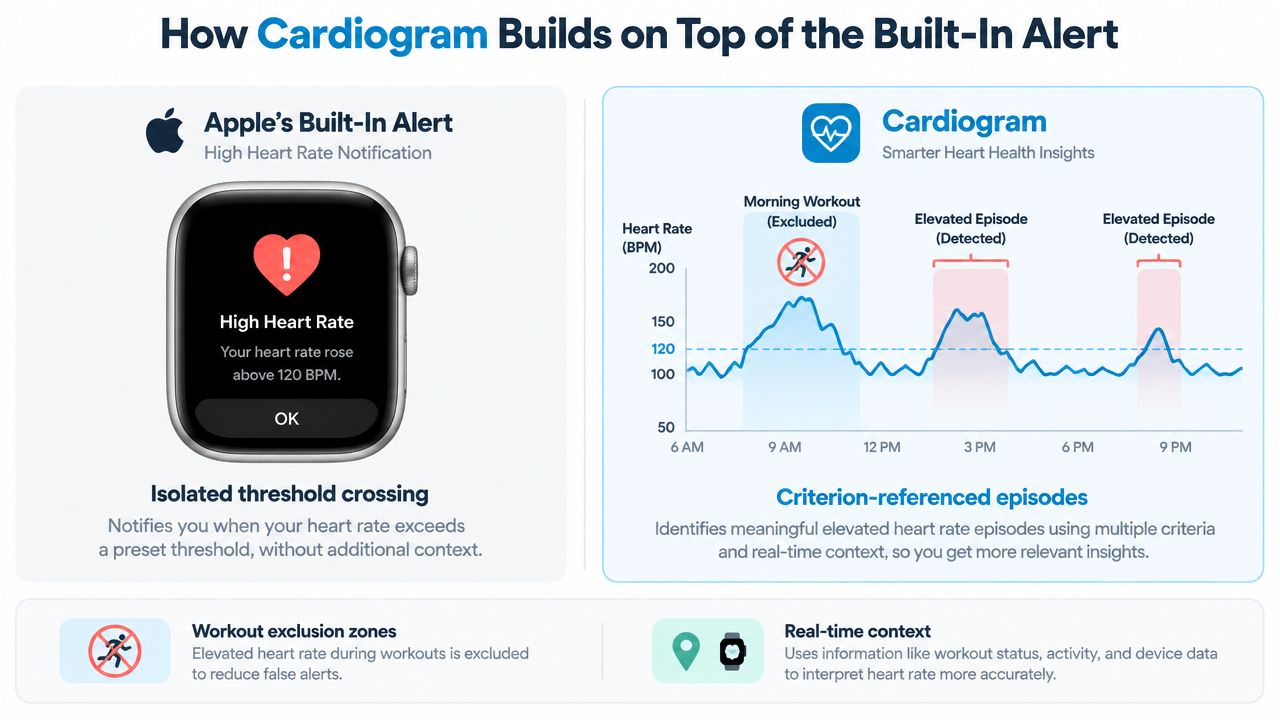
Apple's notification is intentionally simple. It tells you that a threshold or rhythm pattern was detected, but it doesn't create a detailed episode narrative. For unexplained tachycardia, especially with orthostatic symptoms, that leaves important gaps: baseline rate, peak rate, duration, posture, symptoms, hydration, medication timing, and whether the episode occurred during exercise.
Cardiogram adds an analysis layer to Apple Health heart-rate data. Its monitoring features detect 30+ bpm rises within 5 minutes, recording baseline, peak, sustained duration, and timing in an episode feed. That criterion is designed for structured review of tachycardic patterns, not for replacing the Apple Watch's built-in alert.
From a tap on the wrist to a usable record
The practical difference is persistence and context. A stock alert may capture an isolated threshold crossing. Cardiogram can organize repeated events into episodes, exclude workouts and recovery periods from episode counts, and let you attach symptoms and possible triggers such as dizziness, palpitations, fatigue, brain fog, hydration, salt intake, sleep, and medications.
That structure changes the clinician conversation. Instead of presenting a confusing series of screenshots, you can review when episodes occurred, how long they lasted, what the heart rate did, and what symptoms accompanied them. Weekly summaries, resting-rate trends, and episode heatmaps help show whether the pattern clusters around certain times or conditions.
The app also provides an exportable PDF report that states the detection criterion and summarizes episodes, trends, and logged context for clinical review. It uses read-only Apple Health integration, processes analysis on device, and syncs through the user's iCloud. Those are practical features for people who want longitudinal data without adding another wearable.
A useful report doesn't just show that your heart rate was high. It shows what happened before, during, and after the episode.
Why POTS and Dysautonomia Patients Treat Alerts Differently
You stand up from the sofa to answer the door. Within moments, your watch shows a rapid rise and later sends a high-rate notification. You sit back down, feel light-headed, and notice that the number begins to fall. For someone with POTS or another form of dysautonomia, that sequence may be more informative than the alert alone.
The key variables are posture, symptoms, and duration. A heart rate that rises after standing can reflect an orthostatic pattern, but the watch doesn't diagnose POTS. It records pulse behavior. A clinician still needs the history, examination, and appropriate testing.
Read the episode as postural data
When an alert occurs, note whether you were:
- Standing or seated: Record the position before and during the rise.
- Symptomatic: Log dizziness, palpitations, fatigue, brain fog, weakness, or breathlessness.
- Hydrated and fed: Dehydration, illness, heat, and inadequate intake can alter how you feel and how your pulse responds.
- Recently active: Exclude exercise and recovery from your interpretation when possible.
Apple's inactivity-aware logic matters here because an orthostatic trigger may happen while you're standing still, even though you aren't exercising. A brief rise may not create a notification, while a sustained episode can become visible after the watch observes the pattern for long enough.
Don't chase every alert by repeatedly changing thresholds. Collect a consistent record first. Repeated episodes across days can show whether the pattern relates to standing, mornings, meals, sleep loss, illness, or medication timing. That is the kind of organized history a dysautonomia-aware clinician can use to decide what evaluation is appropriate.
If an episode includes fainting, near-fainting, chest pain, serious breathing difficulty, or ongoing deterioration, treat the symptoms as the priority. The watch can support the record, but it shouldn't delay urgent care.
False Positives, Missed Alerts, and How to Reduce Both
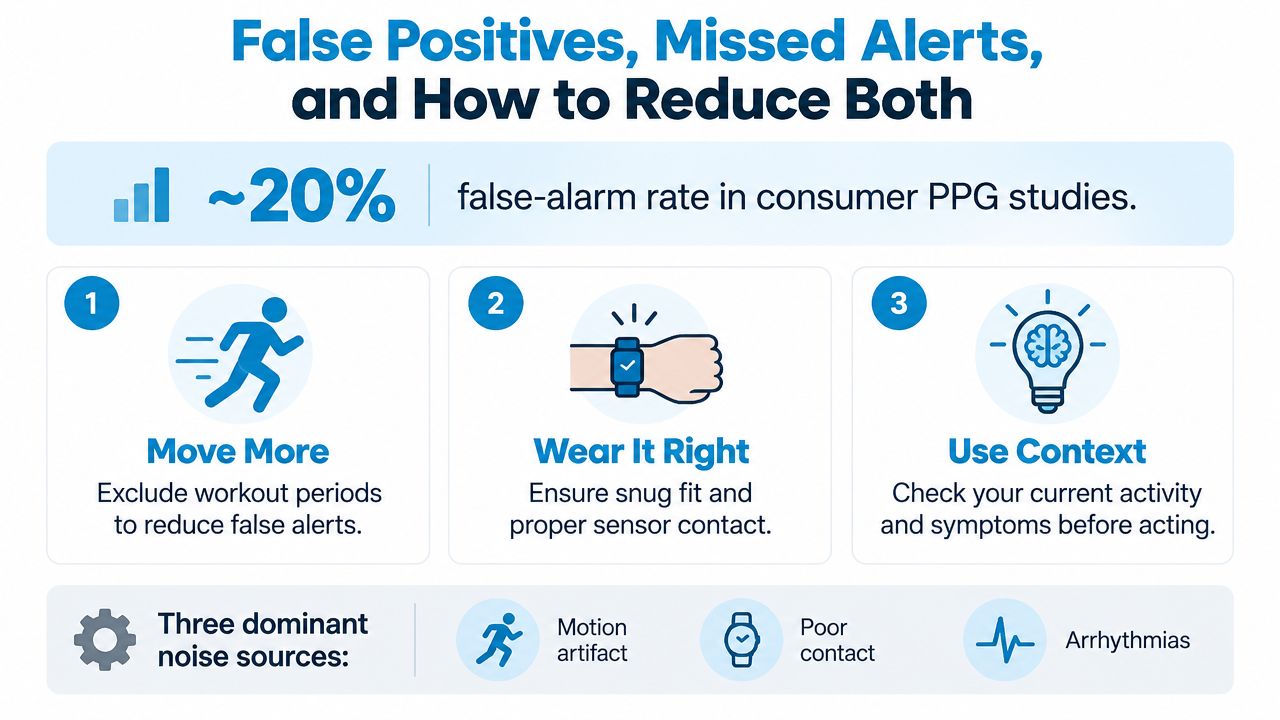
Wearable heart-rate monitoring is useful, but it isn't immune to false alarms. A broad review of wearable-device monitoring cited approximately 20% false alerts, as summarized in the Apple Watch accuracy discussion. That figure doesn't predict your personal experience, and it doesn't mean alerts are worthless. It does mean you should design a filter before anxiety designs one for you.
Motion is a major source of noise. Typing, gripping a steering wheel, moving the wrist, or shifting during sleep can disrupt optical measurements. Exercise can also bleed into the period after a workout, when the watch still sees a changing signal but you may already consider yourself inactive. Poor contact from a loose band, cold skin, tattoos, or reduced blood flow can further degrade readings. Apple's own irregular-rhythm guidance acknowledges that motion and signal conditions can limit detection, so a missed alert isn't proof that nothing happened.
Reduce noise without hiding the signal
Wear the watch snugly, with the sensor making consistent skin contact. If a reading looks implausible, pause, sit still, and take another measurement rather than reacting to the first number.
Use workout and recovery context aggressively. A high rate during a run is expected physiology, not the setting in which a threshold alert provides its clearest information. For persistent unexplained episodes, a structured app can exclude those periods from episode counts and focus attention on inactive tachycardia.
You can also raise the high threshold if notifications repeatedly interrupt ordinary life, but do that only after reviewing what you're filtering out. Focus settings can silence low-priority buzzes without erasing the underlying health record. I wouldn't use a threshold change to conceal symptoms that are recurring, worsening, or paired with dizziness or faintness.
Heart-rate accuracy also changes with activity intensity. In an Apple Watch 3 comparison against ECG, the mean difference was -1.80 bpm, the mean absolute error was 5.86%, and agreement was 95%. A controlled validation study found very good validity during walking and good validity during recovery, but validity fell as exercise intensity rose, as described in the peer-reviewed evaluation.
Quick Answers to the Questions Readers Ask Next
Will the watch alert during sleep?
It can record heart-rate data during sleep, but the notification experience depends on your notification and Focus settings. Sleep Focus may silence the wrist notification even while health data continues to be recorded. Review the Heart Rate app and Focus configuration if overnight alerts matter to you.
A sleep alert without symptoms isn't automatically an emergency. Check for illness, a loose fit, unusual movement, and whether the pattern repeats. Persistent or symptomatic overnight episodes should be discussed with a clinician.
Can you silence the buzz without disabling detection?
Yes. Use Focus and notification controls to reduce interruptions while keeping the health feature enabled. The aim is to mute the attention-grabbing sound or vibration, not to delete the underlying record.
If you're adjusting settings because alerts are frequent, first determine whether they correspond with posture, symptoms, activity, or poor sensor contact. Silence is reasonable. Ignoring a recurring pattern isn't.
How do you export heart-rate history?
The Health app can export your health data for sharing and review, although the resulting file may be difficult for a clinician to interpret without organization. For a focused appointment, gather timestamps, screenshots or recordings, symptoms, posture, and relevant activity context.
A clinician-ready PDF report is more useful when it summarizes episodes rather than presenting an unfiltered stream. It should make the detection rule clear and show the timing, duration, rate pattern, and symptoms attached to each event.
When should recurring alerts lead to a doctor visit?
Arrange clinical review when alerts recur without exercise, especially if they coincide with palpitations, dizziness, near-fainting, breathlessness, unusual fatigue, or abrupt episodes that start and stop. Don't keep adjusting thresholds to make a persistent problem disappear from view.
The Apple Heart Study illustrates why timing matters. Only 34% of participants who received an irregular pulse notification and used an ECG patch about a week later were found to have AFib, showing that intermittent rhythm problems may not be present when a later test occurs, according to Stanford Medicine's report. Bring the episode history to your clinician, and seek urgent care for severe or ongoing symptoms rather than waiting for more watch data.
Cardiogram turns Apple Watch heart-rate history into structured tachycardia episodes with timing, duration, symptoms, trends, and clinician-ready reporting. If repeated alerts or unexplained postural spikes are making your data difficult to interpret, visit Cardiogram to review how the app can organize the pattern.