You stand up from the sofa and your watch suddenly shows 135 bpm. Or you feel a flutter during a meeting, open your health app, and find a smooth-looking graph that doesn't tell you whether the episode began after standing, followed lunch, or lasted long enough to discuss with a cardiologist.
That gap explains why the best health tracking apps for heart rate aren't necessarily the apps with the most workout features. A step counter can show movement. A calorie dashboard can show activity. Neither automatically turns unexplained tachycardia, palpitations, dizziness, and posture changes into a useful clinical timeline.
The health-app market is already mature. Health apps generated $3.5 billion in revenue in 2025, with 313 million users and 405 million downloads, according to Business of Apps' health-app market data. The challenge isn't finding an app. It's choosing one that matches your symptoms, wearable, privacy expectations, and next appointment.
| Monitoring priority | Best fit | Main trade-off |
|---|---|---|
| Continuous Apple Watch context | Apple Health plus a focused monitoring app | Health data is broad, but interpretation may be limited |
| ECG-grade event capture | A dedicated ECG device or app | Captures episodes well, but won't replace continuous trend data |
| POTS and dysautonomia pattern review | A condition-focused tracker with posture and symptom logs | Requires more deliberate tagging |
| Privacy-first tracking | On-device processing and local HealthKit data | Sharing and cross-device analysis can be less convenient |
| Simple heart-rate alerts | Native watch alerts | Alerts are easy to enable, but context is often sparse |
Why Heart Rate Tracking Needs a Different Kind of Health App
A generic fitness tracker answers, “How active were you?” A cardiac and autonomic tracker needs to answer, “What happened to my heart rate, when did it happen, what was I doing, and can a clinician interpret it?”
That distinction matters during a suspected orthostatic episode. If your heart rate rises after you move from supine to standing, the useful record includes the starting baseline, peak rate, duration, posture, symptoms, and surrounding activity. A single high reading can't establish that sequence. A daily average can hide it completely.
Historical usage shows that people already use health apps for practical self-monitoring. In an NYU Langone analysis of 1,604 adult smartphone users, 58% had downloaded at least one health-related app, while 53% tracked physical activity, 48% tracked food consumption, and 47% tracked weight loss, as reported in NYU Langone's survey analysis. Those habits create a strong baseline, but cardiac monitoring demands more than regular logging.
Start with the episode, not the dashboard
First, decide what event you're trying to capture. It might be a sudden rise after standing, sustained tachycardia during rest, palpitations after eating, or a recurring pattern linked to poor sleep or medication timing.
Then check whether the app records heart rate frequently enough to preserve the event. On-demand measurements are useful when you remember to take them, but they miss episodes that begin while you're working, sleeping, or walking between rooms. Background sampling provides better context, provided the watch records enough data and the app explains gaps.
Separate fitness-grade data from clinical context
Fitness apps optimize for pace, effort, calories, and training load. Those metrics can be useful, but they don't automatically provide posture tags, symptom annotations, threshold rules, or clinician-ready reports.
A serious monitoring workflow should let you move from raw readings to an interpretable timeline. It should identify the event, connect it to what you felt and did, and export the result without asking a clinician to decode an enormous spreadsheet.
Practical rule: If an app shows you that your heart rate was high but can't show what happened immediately before and after the spike, it's a fitness dashboard, not a complete autonomic-monitoring tool.
A tracker also isn't a diagnosis. A recurring pattern deserves medical review, especially if it comes with chest pain, fainting, severe shortness of breath, or sustained symptoms. Use the app to improve the record you bring to a professional, not to make a diagnosis from a graph.
Core Features That Matter in a Heart Rate and Autonomic App
The difference between a useful tracker and a noisy one appears in the details. For POTS and dysautonomia, the app should reduce the work required to reconstruct an episode while preserving enough context for a clinician to question or confirm the pattern.
Continuous sampling must preserve the sequence
Background heart-rate data is more valuable than occasional manual readings because autonomic episodes can begin without warning. Look for a clear record of baseline, rise, peak, sustained duration, and recovery. An app that only displays the highest number gives you a dramatic moment, not an event.
Threshold alerts should also be configurable. A fixed high-rate notification may be useful for some people, but orthostatic symptoms vary. The better design lets you define a threshold or detection rule that reflects your baseline and distinguishes a brief excursion from a sustained episode.
HRV needs trends, not isolated scores
Heart-rate variability, including measures such as SDNN, can add recovery and autonomic context. One low value shouldn't dominate your interpretation. Look for day-to-day and week-to-week views, overnight trends, and the ability to compare HRV with sleep, illness, stress, meals, and symptoms.
A resting heart-rate baseline deserves the same treatment. A personalized baseline makes a change more meaningful than a generic zone designed for exercise. The app should make it easy to see whether your resting rate is shifting over time rather than forcing you to inspect individual readings.
For a deeper explanation of how wearable data can support longitudinal monitoring, see this guide to wearable health monitoring.
Context turns readings into evidence
Posture tagging is essential. The app should distinguish supine, sitting, standing, walking, and exercise, either automatically or through quick manual entries. For a suspected orthostatic pattern, the sequence matters more than a disconnected list of heart-rate values.
Symptom logging should be equally fast. Useful entries include dizziness, palpitations, fatigue, brain fog, nausea, weakness, hydration, salt intake, meals, sleep quality, and medication timing. If recording a symptom takes too many taps, you'll stop doing it, and the dataset will become selective.
Longitudinal visualization should support more than a calendar. You want to compare similar times of day, recurring triggers, and menstrual-cycle phases when relevant. Heatmaps and episode feeds can reveal patterns that a single line chart hides.
Exports should serve the appointment
Raw data is not the same as a report. Prefer tools that can generate a clinician-ready PDF with detection criteria, episode summaries, trends, and linked context. CSV export still matters for detailed analysis, while FHIR support can be valuable where a clinical system accepts structured health data.
The strongest workflow offers both. A concise report helps during an appointment. A raw export gives you control if a specialist wants to inspect the underlying timeline.
Leading Health Tracking Apps Compared Side by Side
A watch can flag a fast pulse during a grocery run, yet leave you with no useful record for the appointment. For POTS and dysautonomia, the better comparison asks a narrower question: can the app detect cardiac episodes, preserve privacy on the device, work reliably with Apple Watch, and turn the timeline into a clinician-ready report?
The market contains broad health repositories, watch-native alert apps, event-focused monitors, HRV and recovery tools, and symptom-led trackers. They solve different problems, so a single overall score hides the trade-offs that matter.
| App type | Apple Watch Integration | HR Threshold Alerts | HRV Tracking | Episode Detection | Symptom Diary | Clinician Export | Privacy Model | POTS Fit |
|---|---|---|---|---|---|---|---|---|
| Apple Health platform | Deep HealthKit foundation | Native alerts vary by watch settings | Stores available HRV data | Limited interpretation | Basic manual entries | Sharing and exports vary | Apple ecosystem and iCloud controls | Strong for continuous context, limited for interpretation |
| Watch-native alert app | Watch-focused | Built around heart-rate monitoring | Available where supported | Focused alerts, limited clinical framing | Limited to moderate | Depends on export tools | App-specific storage and permissions | Useful for watch-first alerts |
| Watch analytics dashboard | Deep Apple Watch and HealthKit use | Configurable features vary | Strong visualization | Primarily analytical rather than diagnostic | Moderate | Export capabilities vary | Apple ecosystem with app permissions | Good for trend inspection |
| ECG-oriented monitor | Apple Watch and ECG-oriented workflows | Event-focused | Context depends on connected data | Strong event review | Strong | Clinician-oriented reports | App privacy and connected-device policies apply | Strong for palpitations and appointment preparation |
| Recovery-score tool | Apple Health integration | Emphasis varies by plan | Strong HRV emphasis | Pattern analysis rather than condition-specific detection | Moderate | Export and sharing vary | Cloud features require policy review | Useful for broader recovery context |
| Cardiogram | Read-only Apple Health integration | Real-time episode alerts | Resting and longitudinal trends | Automatic tachycardic episode detection | Strong context logging | Exportable PDF report | On-device analysis with iCloud sync | Strong for Apple Watch users tracking suspected POTS |
| Tachycardia alert app | Apple Watch-focused | Built around tachycardia alerts | Limited relative to dedicated HRV tools | Episode alerts, manual review may remain | Limited to moderate | Export options vary | App-specific data handling | Useful for immediate threshold awareness |
| Symptom and chronic-illness tracker | Symptom and chronic-illness workflow | Emphasis on symptom pacing | Recovery context varies | Less focused on cardiac episode reconstruction | Strong symptom tracking | Sharing options vary | Review permissions and cloud policy | Useful when symptom burden and pacing lead |
Choose the design that matches the question
Watch-native alert apps fit users who need a prompt on the wrist during daily activity. Their weakness is usually the report. A notification can show that a threshold was crossed, but it may not connect the event to standing, walking, exercise, meals, or symptoms.
ECG-oriented tools suit rhythm questions. They can help capture an event for review, but they do not replace continuous Apple Health context. Choose event capture when episodes are infrequent or unpredictable. Choose longitudinal monitoring when symptoms repeatedly follow posture changes.
HRV-centered tools help track recovery and autonomic trends. They can show changes over time, but a recovery score does not provide a posture-linked tachycardia timeline. If sustained heart-rate rises after standing are the main concern, HRV scoring alone is the wrong primary tool.
Symptom-led trackers are strongest for daily burden. They connect fatigue, dizziness, sleep, meals, medication timing, and pacing, though another source may be needed for high-frequency heart-rate data.
For a focused cardiac workflow, Cardiogram reads Apple Health heart-rate data, detects tachycardic episodes, links symptoms and triggers, and produces a PDF summary. Its narrower scope is useful when the appointment centers on unexplained heart-rate episodes rather than general fitness progress. The practical choice is clear: use a broad health repository for coverage, a watch-native app for immediate alerts, or a condition-focused tracker when detection and clinician communication matter most.
Privacy Architecture and Data Control Explained
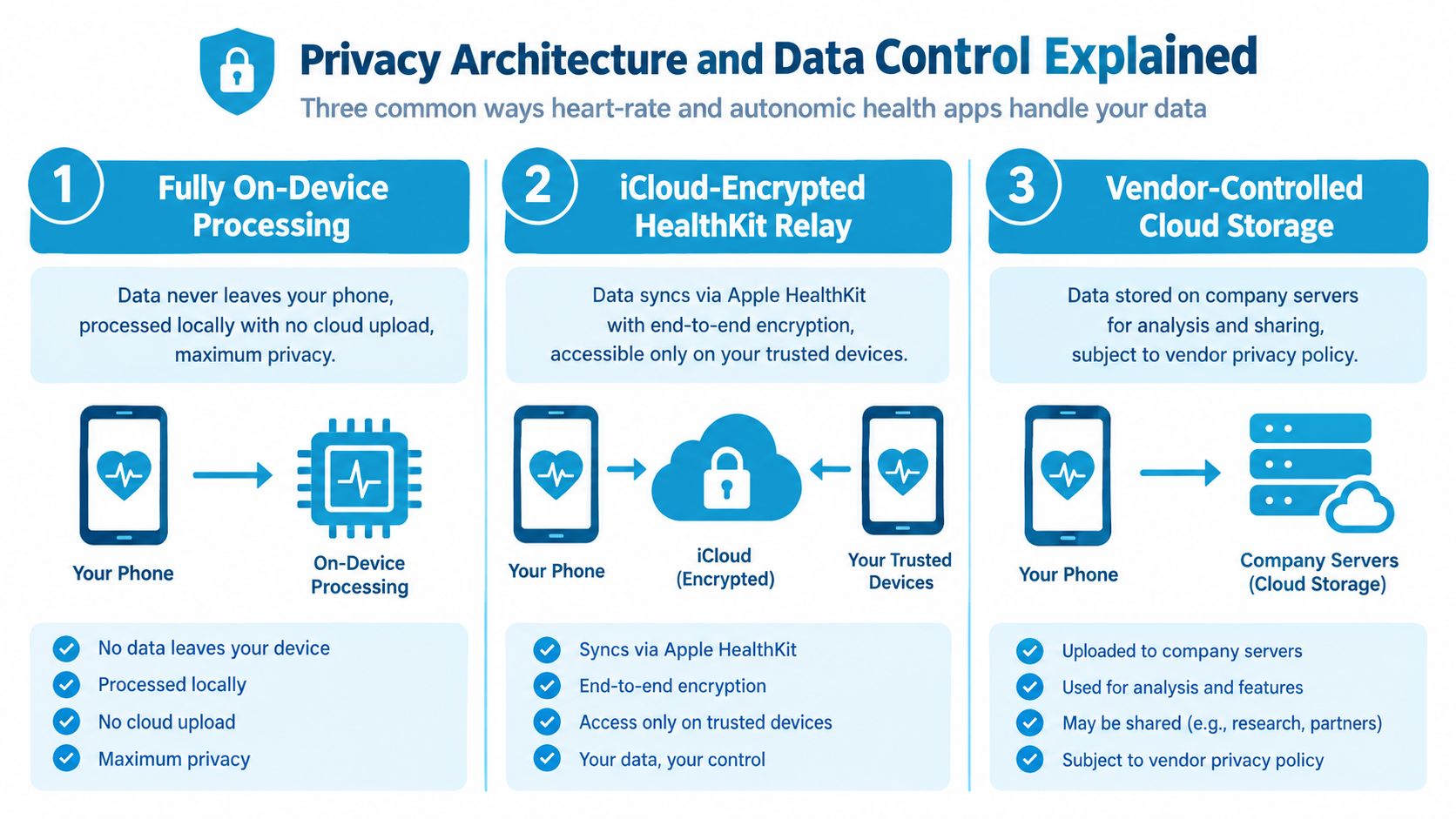
A heart-rate app can detect a cardiac episode yet still create privacy problems if your readings, symptoms, and reports travel through unclear systems. Check the full path from watch to phone, from phone to analysis, and from analysis to the clinician who receives the report.
Fully on-device processing
With on-device processing, raw heart-rate samples and derived calculations stay on your phone. Detection happens locally, limiting exposure to a vendor server and giving you tighter control over what leaves the device.
The cost is convenience. You may lose multi-device access, server-powered analysis, or automatic sharing. If your phone fails before you export the records, recovery becomes your responsibility. For users tracking POTS or dysautonomia, export a regular backup rather than treating local storage as permanent protection.
iCloud-encrypted HealthKit relay
Some apps read Apple Health data and rely on Apple's ecosystem to synchronize it. Data can move between trusted devices through encrypted infrastructure, while the monitoring app avoids maintaining its own central health-data database.
This setup fits Apple Watch users who want continuous context without another cloud account. Review permissions carefully. Read-only HealthKit access is preferable when you do not want an app writing data back into your health record. For a practical explanation of permissions, storage, and sharing choices, read this guide to health-data privacy.
Vendor-controlled cloud storage
Cloud-backed services can support cross-device analysis, account recovery, collaboration, and remote clinician workflows. They also make the vendor's privacy policy, security practices, retention rules, and breach response part of your health-data decision.
Guidance on trustworthy health apps recommends checking where data is stored, reviewing requested permissions, and avoiding vague third-party sharing language. A consumer health technology survey found that 73% of wearable or health-app users wanted more control over storing and sharing health information, while 28% cited poor integration across apps, as described in the consumer health technology survey.
Use controlled export when you need to send a concise report to a cardiologist. Choose on-device processing when local storage is your priority, then export your own backup regularly. A private storage architecture does not automatically make a shared PDF clinically secure. Treat the provider handoff as a separate permission decision.
Real World Use Cases for POTS and Dysautonomia
A useful comparison starts with the appointment you need to prepare for, not with an app-store feature list. The same person may need one tool for continuous context and another for ECG-style event capture.
After a tilt-table or stand-test follow-up
You want to compare supine and standing heart-rate behavior without reconstructing the morning from memory. Start recording before the posture change, tag the transition, note symptoms as they appear, and preserve the time sequence.
A condition-focused tracker performs best when it automatically identifies the rise and creates an episode record. A watch-native alert tool may notify you promptly, but you'll probably need to add posture and symptom notes manually. A broad health repository stores the readings, yet it may leave you to build the chart yourself.
After-meal palpitations
Postprandial symptoms require two timelines. The first is physiological, including heart rate and HRV. The second is contextual, including meal timing, hydration, salt intake, medication, and symptoms such as dizziness or brain fog.
A symptom-led app can make the context easy to capture, while an HRV-focused tool can show recovery changes. Neither is sufficient if the data can't be aligned by timestamp. Use quick tags immediately after the meal rather than relying on end-of-day recall.
The useful record isn't “my heart rate was high.” It's “the rise began after a posture change, continued while I was resting, and coincided with dizziness.”
Two weeks before a cardiology appointment
Exportability becomes the deciding factor. You shouldn't spend the night before an appointment copying readings into a document or discovering that detailed history requires a new subscription tier.
A report-oriented app is the practical winner here because it can summarize episodes, trends, and context in a format designed for review. A CSV remains valuable when a specialist requests detail, but raw rows shouldn't be the only option. If the chosen app lacks clinician export, create a consistent manual log with timestamps, posture, symptoms, meals, hydration, medication, and activity, then bring both the log and the native health record.
The missing feature across many tools is low-friction annotation. Even an excellent detector can't know whether you were standing in a queue, lying down after a meal, or recovering from exercise unless the app captures that context.
Pricing, Trials, and What You Pay For
Pricing changes often, and App Store terms vary by region. A low download price does not show the full cost. The practical question is whether payment blocks the function you need before a clinical appointment.
| App type | Free Tier | Paid Price | Trial | Key Paywall Feature |
|---|---|---|---|---|
| Apple Health | Broad native health storage | Included with Apple devices | No separate app trial | Advanced interpretation usually requires another tool |
| A watch-focused monitoring app | Basic watch monitoring may be available | Varies by store and plan | Check current store terms | Extended alerts or watch features may require payment |
| A heart-rate charting app | Core charts may be available | Varies by store and plan | Check current store terms | Deeper history, reports, or complications may be paid |
| An event-recording tool | Limited access may be available | Varies by store and plan | Check current store terms | Advanced event review and reports may require membership |
| An HRV recovery app | Freemium access | Varies by store and plan | Check current store terms | Extended HRV analysis and insights |
| Cardiogram | Trial access | Annual membership, regional price varies | 3-day free trial | Full episode analysis and reporting |
| A threshold-alert app | Basic alerting may be available | Varies by store and plan | Check current store terms | Advanced alerts and history may be paid |
| A symptom-logging app | Basic symptom tracking may be available | Varies by store and plan | Check current store terms | Deeper chronic-illness insights and sharing |
A one-time purchase is easier to understand, but it may include less continuing analysis. A subscription can make sense when an app keeps processing new Apple Health data, preserves long-term trends, and produces clinician-ready reports. It offers less value when the paid tier adds only cosmetic charts or a watch complication.
Test the exact workflow before subscribing. Can you import recent data, record an episode, tag symptoms, and export a report? Is the report available during the trial, or only after payment? These checks matter more than a “free” label, particularly when you need cardiac episode detection, Apple Watch continuity, or a clear record for POTS and dysautonomia review.
A useful price comparison also separates consumer tracking from formal monitoring. See this overview of Holter monitoring cost for context on clinical monitoring options. It does not replace a current provider quote, but it helps define what an app subscription covers and what it cannot provide.
Which Health Tracking App Fits Your Situation
You wake with a racing pulse, stand up, and feel the room shift. The right app should help you capture that episode, preserve what happened around it, and produce a record a clinician can review. Choose the smallest reliable setup for those jobs, not the longest feature list.
You need ECG-grade capture for unexplained palpitations
Choose an ECG-oriented workflow, supported by a strong Apple Health trend view when available. An event recording addresses the rhythm question, while continuous watch data shows what happened before and after the episode.
Use this setup when fluttering or irregular-feeling beats are the main concern. A heart-rate graph cannot establish rhythm, and an ECG capture alone cannot show whether symptoms repeatedly follow standing, meals, disrupted sleep, or exertion.
You own an Apple Watch and want continuous autonomic context
Keep Apple Health as the underlying record, then add a tracker that interprets heart-rate history, HRV, posture, and symptoms. Watch-based alerts help you respond immediately. An analytical tracker makes multi-day patterns easier to inspect and report.
Ignore polished recovery scores unless you can connect them to real symptoms. For suspected dysautonomia, prioritize a traceable relationship between posture, heart rate, episode duration, and how you felt. If manual entry is required, create a short set of consistent tags and use them for every event.
You're preparing for a tilt-table or cardiology appointment
Choose a condition-focused workflow with a clinician-ready PDF and symptom journal. The report should state its detection rule, summarize episodes, and connect readings with dizziness, palpitations, fatigue, hydration, sleep, salt, and medication timing.
A raw export can support the report, but it should not be the only deliverable. Give your clinician a concise overview first, with detailed readings available for inspection.
You refuse cloud uploads
Use local HealthKit storage and apps that process information on the device. Review every permission, disable access that is unnecessary, and export backups you control.
Privacy has a practical cost. Cross-device sync, remote analysis, and quick sharing may be limited. That trade-off is reasonable when data control matters more than automated interpretation.
You're starting on a budget
Begin with built-in heart-rate alerts and the health repository already on your phone. Add a freemium tracker only when it answers a question the built-in system cannot, such as HRV trends, symptom correlation, or an exportable report.
A gradual setup is easier to maintain. One national survey found that 45.7% of users discontinued some health apps, even though 65% believed the apps improved their health, according to the published mHealth survey. Start with one repeatable workflow rather than several dashboards you will stop checking.
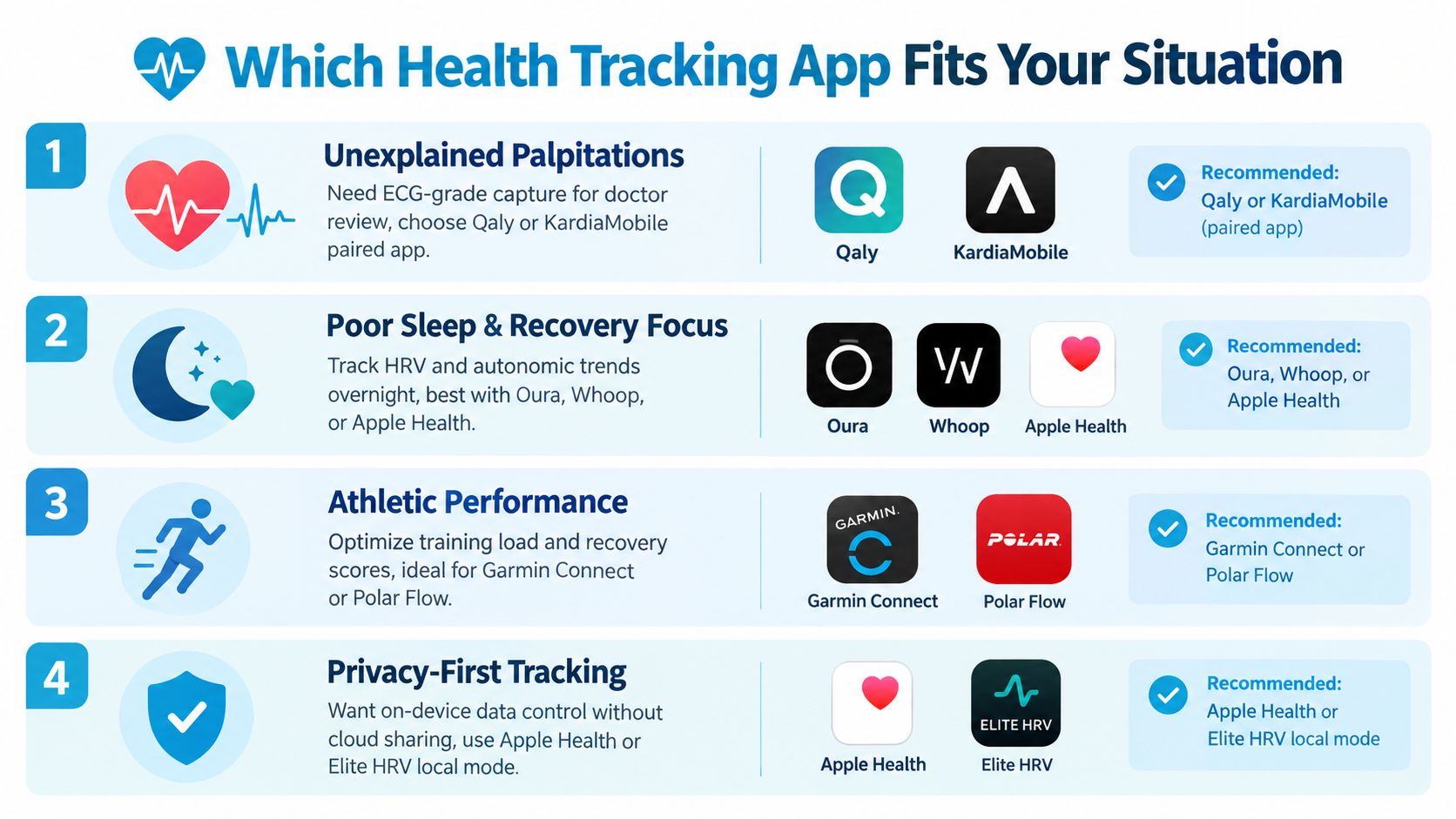
For an Apple Watch user with suspected POTS, my pick is a condition-focused episode tracker paired with Apple Health. The tracker should handle event-level detection, posture and symptom context, and clinician-ready reporting. Apple Health should preserve the continuous trend record. This division of work is more useful than asking one general fitness app to handle detection, context, and medical reporting.
If you experience fainting, chest pain, severe breathlessness, or a persistent alarming heart rate, seek urgent medical care instead of waiting for an app report.
Cardiogram reads Apple Health heart-rate data on device, detects tachycardic episodes, links symptoms and triggers, and creates clinician-ready PDF summaries for review. If you're using an Apple Watch to investigate possible POTS, dysautonomia, or unexplained heart-rate episodes, visit Cardiogram to see how its monitoring workflow fits your next appointment.