If you've ever opened your iPhone's Health app after a dizzy spell, a racing heartbeat, or a strange afternoon of exhaustion, you've probably felt the same frustration: the data is there, but the meaning isn't. The charts can look busy and still leave you wondering whether your body was reacting to posture, stress, activity, or something else entirely.
That gap matters most for people with suspected POTS or dysautonomia. Apple Health on iPhone can collect heart-rate information from Apple Watch and organize it safely, but raw readings alone don't tell a clinician what happened, why it happened, or whether the episode fits an orthostatic pattern.
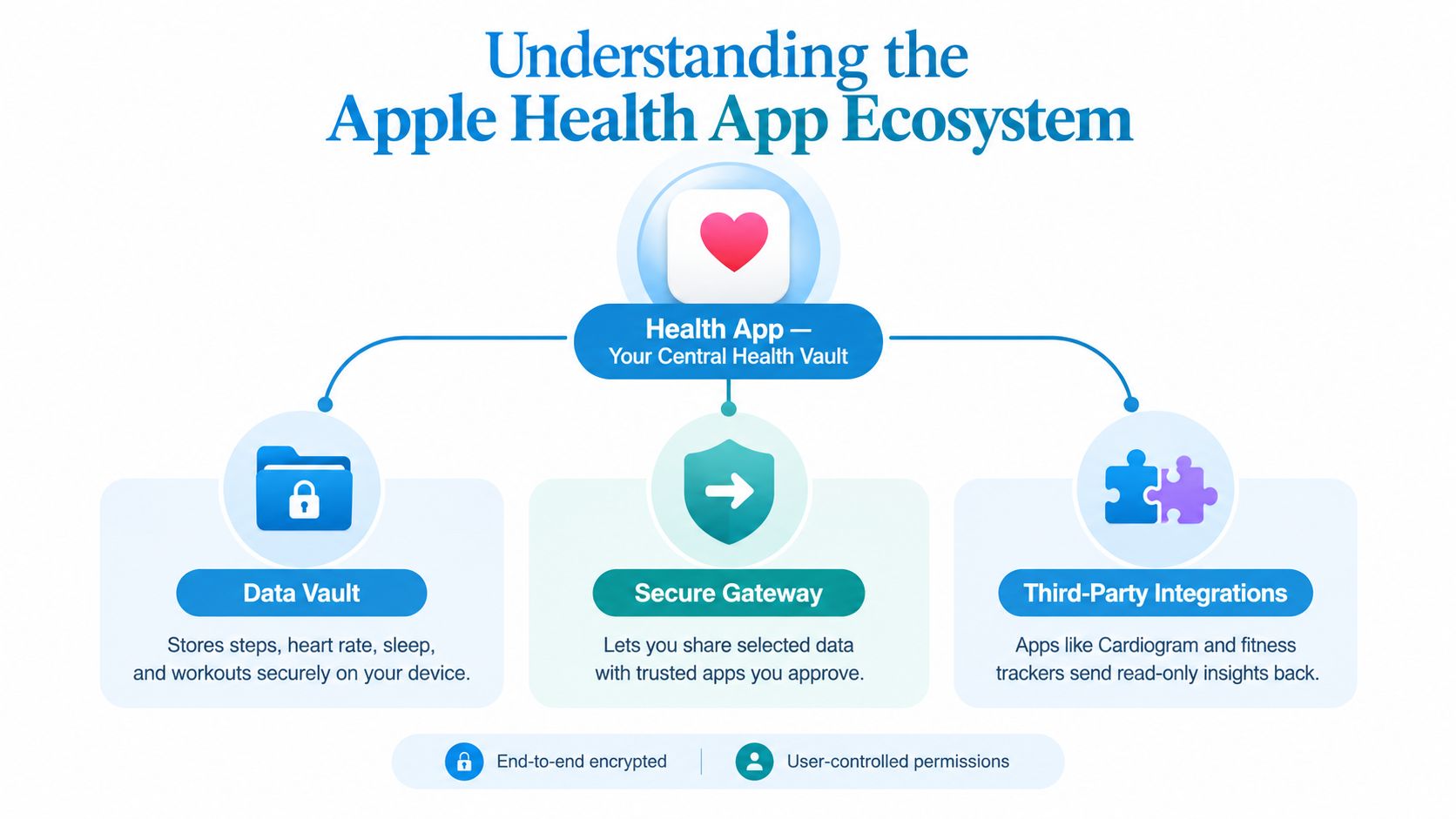
Understanding the Apple Health App Ecosystem
A lot of people treat the Apple Health app for iPhone like a scrapbook of wellness metrics. That misses its actual value. It behaves more like a digital vault, one that can also pass selected information to approved apps when you give permission.
Apple introduced the Health app at WWDC on June 2, 2014, and released it with iOS 8 on September 17, 2014. Apple describes it as available on every iPhone, which matters because it gives health software access to a broad installed base instead of asking users to buy a separate monitoring platform first. The associated HealthKit framework is what makes the exchange possible, since it lets authorized third-party apps and devices read and write structured health data with your approval. Apple's Health Report PDF
Why that foundation matters
A person with palpitations may assume their watch is “tracking everything” in a continuous stream. It isn't. Apple Health is the layer that stores what the watch captures and makes it usable in a structured way, provided the user has given read access and the device data is compatible.
Practical rule: treat Apple Health as a permissioned data layer, not a diagnosis engine.
That distinction is especially important for heart-rate monitoring. Apple Watch heart-rate measurements can be stored in Apple Health and made available to compatible apps through HealthKit permissions, which is why an app can analyze trends without needing a separate sensor system. Apple later expanded the ecosystem with Apple Watch, released in 2015, and kept adding health features and categories over later iOS releases. The result is a system that can support longitudinal review, but only if the user authorizes access and the watch has recorded usable data.
What patients usually misunderstand
Many readers expect the app to “interpret” the data for them. Instead, Apple Health mainly organizes, stores, and shares. That's useful, but it also means a person with suspected POTS can open the app, see many readings, and still not know whether a morning spike was a posture change, a walk to the kitchen, or a true orthostatic episode.
What Data Does Apple Health Collect
Apple Health stores heart-rate readings as discrete quantity measurements, not as one long continuous movie of your physiology. That matters because the app may condense or coalesce samples before another app reads them, so gaps don't always mean your heart rate was stable, and a cluster of readings doesn't always mean the story is complete. Apple's documentation also notes that heart-rate records can carry motion-context metadata, which gives downstream analysis a clue about whether a reading happened during movement. Apple support on heart-rate data
For anyone trying to understand apple health app for iphone data, the key point is this, the app collects measurements that can be analyzed later, but it doesn't automatically turn them into a clinical narrative. Apple Watch's optical sensor supports approximately 30 to 210 beats per minute, but the cadence and availability of measurements vary with device generation, motion, contact, and signal quality. So a heart-rate trend should be read with the sampling pattern in mind, not just the values themselves.
How to think about the heart-rate view
A useful way to read Apple Health is to separate three questions:
- What was recorded? The sample itself, including the timestamp.
- Was the body moving? Motion metadata may help, but it doesn't answer everything.
- Is the pattern clinically meaningful? That depends on context, not just the number on the screen.
A missing stretch of data is not automatically normal. It may simply mean the app didn't capture a usable sample.
People with POTS often hit a wall here. Generic heart-rate graphs can show a rise, but they don't explain whether the rise followed standing, exercise, recovery, dehydration, or medication timing. They also don't reliably distinguish a brief wobble from a sustained episode worth reviewing with a clinician.
The practical takeaway is simple. Apple Health gives you the raw material. The hard part is deciding which signals deserve attention, and which ones are just noise.
Privacy and HealthKit Permissions Explained
The privacy story starts with control. Apple says HealthKit data is encrypted on the device, and health records downloaded from participating providers travel directly to the iPhone rather than through Apple's network. If iCloud protections are enabled, Apple also says iCloud can provide end-to-end encryption. Those details matter because heart-rate history can reveal far more than fitness habits, it can expose symptom timing, medication patterns, and daily routines. Apple's Health and privacy PDF

How permissions actually work
When an app asks for Apple Health access, you decide what it can read. In most cases for heart-rate analysis, the safest setup is read-only access, which means the app can analyze your data without writing back to it. That preserves the original record and reduces the risk of accidental changes.
If you're trying to preserve your own record over time, the source of each sample matters. Users also need to know whether data came from the watch, a manually entered note, or another app, because mixed sources can create duplicate or confusing entries. That becomes especially relevant when moving to a new iPhone, replacing a watch, or changing apps.
Why portability deserves attention
Health data is easy to collect and surprisingly easy to fragment. A person may start with one device, later add another, and then lose the thread of what came from where. If you want a complete longitudinal record, you need to understand permissions, iCloud requirements, passcode protection, and the difference between simple synced history and a clinician-readable export.
Important: privacy and usability often pull in opposite directions. The more seamless the ecosystem feels, the easier it is to forget where the data actually lives.
For readers who want a plain-language walkthrough of how this affects personal health records, the privacy notes at Cardiogram's health data privacy page are a useful companion. The core lesson stays the same, though, don't hand over access until you know whether the app only reads your data, or also stores and reshapes it elsewhere.
How Third-Party Apps Integrate with Apple Health
Apple Health becomes more useful when another app turns scattered measurements into a pattern you can act on. That's the promise of HealthKit integration, not more graphs, but better interpretation. An app with read-only access can look at timestamps, motion context, and heart-rate history, then organize those readings into episodes instead of leaving you to hunt for them manually.
That matters for people with intermittent tachycardia. A single chart can hide the problem if the spike happens between routine checks, while a structured episode feed can show when the rise started, how high it went, and how long it stayed high. One option in this space is Cardiogram, which analyzes Apple Health heart-rate data on device and builds episode-based summaries for people tracking tachycardic patterns.
From raw readings to usable episodes
A good integration doesn't just copy Apple Health data into another screen. It asks different questions about the same history.
- Timing: When did the rise begin?
- Magnitude: How far above baseline did it go?
- Duration: Did it stay elevated long enough to matter?
- Context: Was the person moving, exercising, recovering, or resting?
That structure helps explain why specialized analysis can feel so different from the default Health app view. Generic graphs are fine for a quick glance, but they rarely produce the kind of tidy episode record a clinician can use during a visit.
If a reading can't be tied to time, context, and duration, it's hard to discuss as a clinical event.
The value is not automation for its own sake. It's making the data easier to review without forcing patients to rebuild every episode from memory. For a person with palpitations, dizziness, or brain fog, that can be the difference between “I think it happened sometime last week” and “here's the pattern I've been seeing.”
For readers who want a broader technical overview of the integration layer, this Apple Health integration guide explains the practical side of connecting read-only data to analysis. The important point is that Apple Health supplies the raw history, while a specialized app can arrange that history into a story a person and clinician can discuss.
Addressing the Needs of POTS and Dysautonomia Patients
Apple's built-in high-heart-rate notification is useful for general awareness, but it is not designed for POTS screening. Apple says the alert uses a fixed threshold, 120 bpm by default, and only evaluates the user as apparently inactive for 10 minutes. That means it can miss posture-linked rises, short but significant changes, and many episodes that matter in daily life. Apple's heart rate document
For someone with dysautonomia, that design choice is a problem. POTS is about context, not just speed. A heart rate that rises after standing in the kitchen is very different from one that rises during a workout or while climbing stairs, and generic wellness alerts don't separate those situations well.
Why the threshold alone is not enough
A more useful approach is one that looks for a meaningful rise from baseline and then asks whether the episode fits an orthostatic pattern. Expert consensus describes POTS as a sustained heart-rate increase of at least 30 bpm within 10 minutes of upright posture, without significant orthostatic hypotension, with a higher threshold generally used for adolescents. A screen that flags a 30 bpm rise within 5 minutes can be an earlier warning for review, but it is still only a screening observation, not a diagnosis. POTS consensus review
That distinction matters because a phone-based analysis cannot confirm posture, blood pressure, or clinical exclusions such as exercise, dehydration, anemia, thyroid disease, or medication effects. It can, however, help a patient and clinician notice a repeated pattern sooner.
Why privacy by design helps here
Sensitive health data is easiest to trust when it stays close to the user. On-device analysis reduces the need to move raw symptom history into another system just to get a usable summary. That's especially important when the data includes heart-rate surges, symptom logs, and daily routine details that patients may not want spread across multiple servers.
The best monitoring setup is often the one that keeps the data close to the patient and the interpretation close to the clinician.
For people with POTS or suspected dysautonomia, the goal is not more alarms. It's fewer false positives, better context, and a cleaner review of the episodes that truly deserve attention.
Creating Clinician-Ready Reports and Summaries
A clinician doesn't need a wall of screenshots. They need a short record that shows what happened, when it happened, and what else was going on at the time. That's where episode reports beat generic notifications.
Apple Health alone tends to show activity-style charts and scattered measurements. A more focused analysis can turn those readings into a concise summary of episodes, trends, and symptoms. The difference is not cosmetic. It changes how easy it is for a cardiologist or primary care clinician to review your history during a short appointment.
What makes a report usable
A good summary should make three things obvious at a glance:
- Event timing: when each episode happened.
- Episode shape: baseline, peak, and how long it stayed raised.
- Context clues: symptoms, hydration, medications, sleep, or triggers.
That's the kind of structure patients often try to create manually in notes, but manual tracking gets tedious fast. If a report already groups the data into episodes and links it to symptoms, the conversation becomes much easier.
Best use of a report: bring a clean summary to the appointment, then use the detailed history only when the clinician asks for it.
The Apple Health export process can help preserve your raw record, but exports are not the same as interpretation. A clinician-ready document does both jobs more efficiently, it preserves the history and highlights the episodes that matter most.
For a practical guide to moving data out of Apple Health in a readable form, this Apple Health data export guide covers the workflow at a high level. The main advantage of a report is that it saves both you and your clinician from trying to reconstruct the pattern from memory, screenshots, or a stack of disconnected numbers.
Taking Control of Your Health Data
Apple Health gives iPhone users a strong foundation. It stores health information on a device that many people already carry, links to compatible watches through a permission-based framework, and keeps the user in charge of access. For many people, that's enough to spot a trend or show a doctor a concerning stretch of readings.
For POTS and dysautonomia, though, the main limitation is not collection. It's interpretation. A raw heart-rate trace can be honest and still be hard to use clinically. Without posture context, symptom notes, and episode structure, the data can look more certain than it really is. That's why the most useful tools are the ones that preserve privacy, keep the data close to the user, and make the pattern easier to discuss rather than harder.
What to look for in a monitoring setup
When you're deciding how to use Apple Health data, ask a few direct questions:
- Does the app read data without rewriting it?
- Can it separate episodes from ordinary activity?
- Does it keep timestamps and context intact?
- Can it produce something a clinician can scan quickly?
Those questions matter more than flashy dashboards. A clean episode feed with symptom logs is often more valuable than a prettier graph with no clinical context.
Apple Health works best when it's treated as the source layer, not the final answer. That mindset helps patients avoid false reassurance from missed episodes and false alarm from isolated readings that lack context. It also gives people a more realistic sense of what their watch can and can't tell them.
For readers who want a focused way to analyze Apple Health heart-rate history for tachycardic episodes and clinician review, Cardiogram turns read-only HealthKit data into structured episodes, trends, and reports without asking you to leave the Apple ecosystem. If you're ready to make your Apple Watch data easier to understand, visit Cardiogram and see how it can help you turn raw readings into something you can use in care conversations.