A heartbeat monitor is most commonly called a heart rate monitor for everyday use or an ECG/EKG for medical use. The confusing part is that people use the same phrase for several different tools, so the right name depends on what the device measures and why you're using it.
What is a heartbeat monitor called? That question sounds simple until you try to match the name to the situation. A watch on your wrist, a clinic machine, and a short-term recorder can all be called “heartbeat monitors” in casual conversation, but they don't do the same job. One gives you beats per minute, another gives you the heart's electrical pattern, and another helps a clinician catch problems that only show up while you're living your normal day.
What a Heartbeat Monitor Is Called
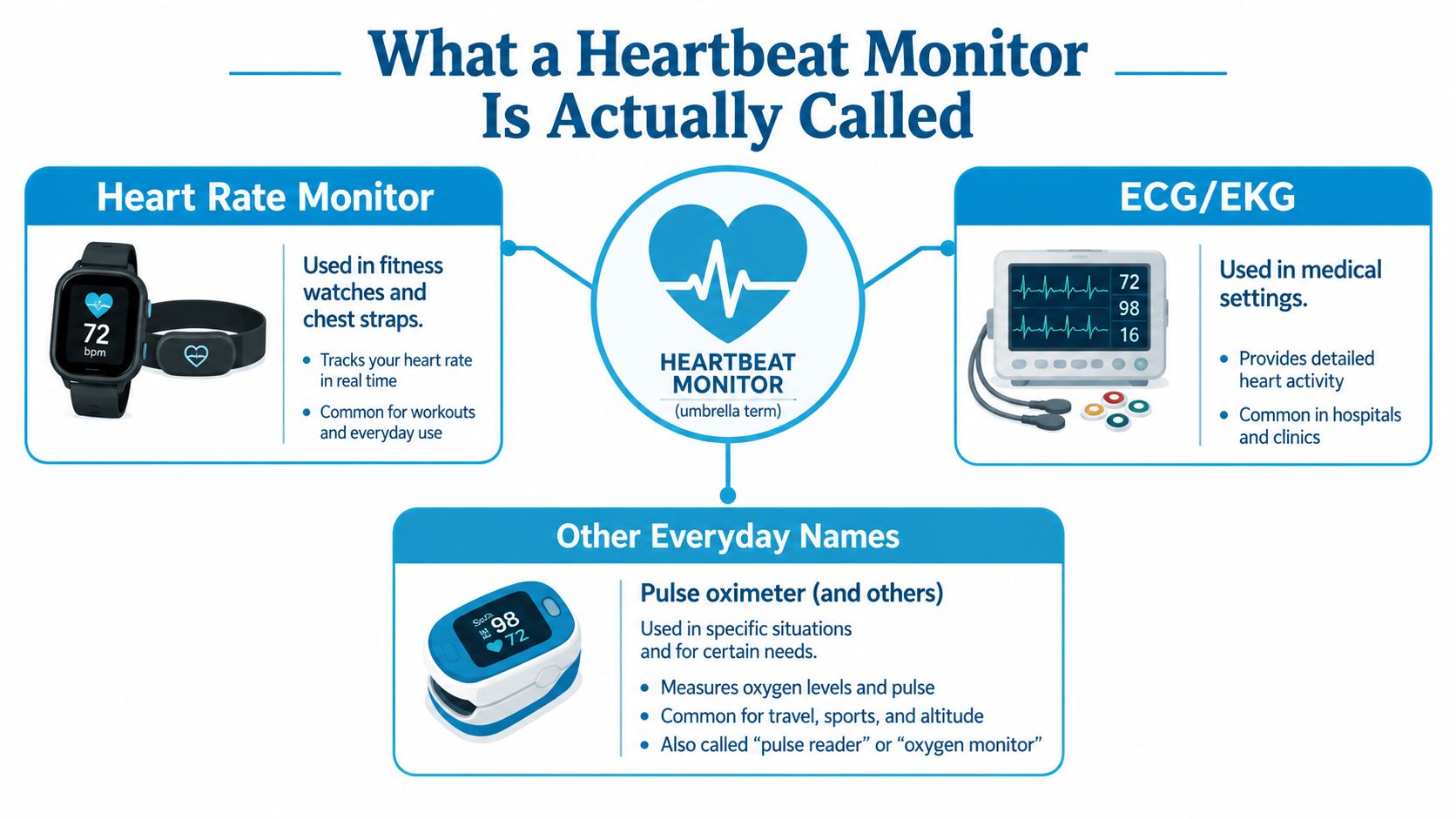
“Heartbeat monitor” is a broad label, not a single device name. The exact term depends on what the device measures and why someone is using it. In everyday conversation, a fitness watch or chest strap is usually a heart rate monitor, because it shows beats per minute. In medical settings, people usually mean an ECG or EKG, which records the heart's electrical activity Mayo Clinic on ECG and EKG terminology.
The name follows the job
A heart rate monitor answers a simple question: how fast is the heart beating right now? That makes it useful for exercise, pacing, and watching trends over time. An ECG/EKG answers a different question, what is the heart's rhythm doing, beat by beat? Clinicians use it when they need a tracing, not just a pulse number.
Other labels get mixed in too. A pulse oximeter measures oxygen saturation and usually estimates pulse at the fingertip, so it can show a pulse without being a true heart monitor. A cardiac event monitor is a separate device for intermittent rhythm tracking, which is useful when symptoms come and go. Brand names can sit on top of these categories, but they do not change what the device does.
A good way to keep the names straight is to match the output to the job. If the device gives you a number like 72 beats per minute, you are looking at a heart rate monitor. If it gives you a tracing of electrical activity, you are looking at an ECG/EKG.
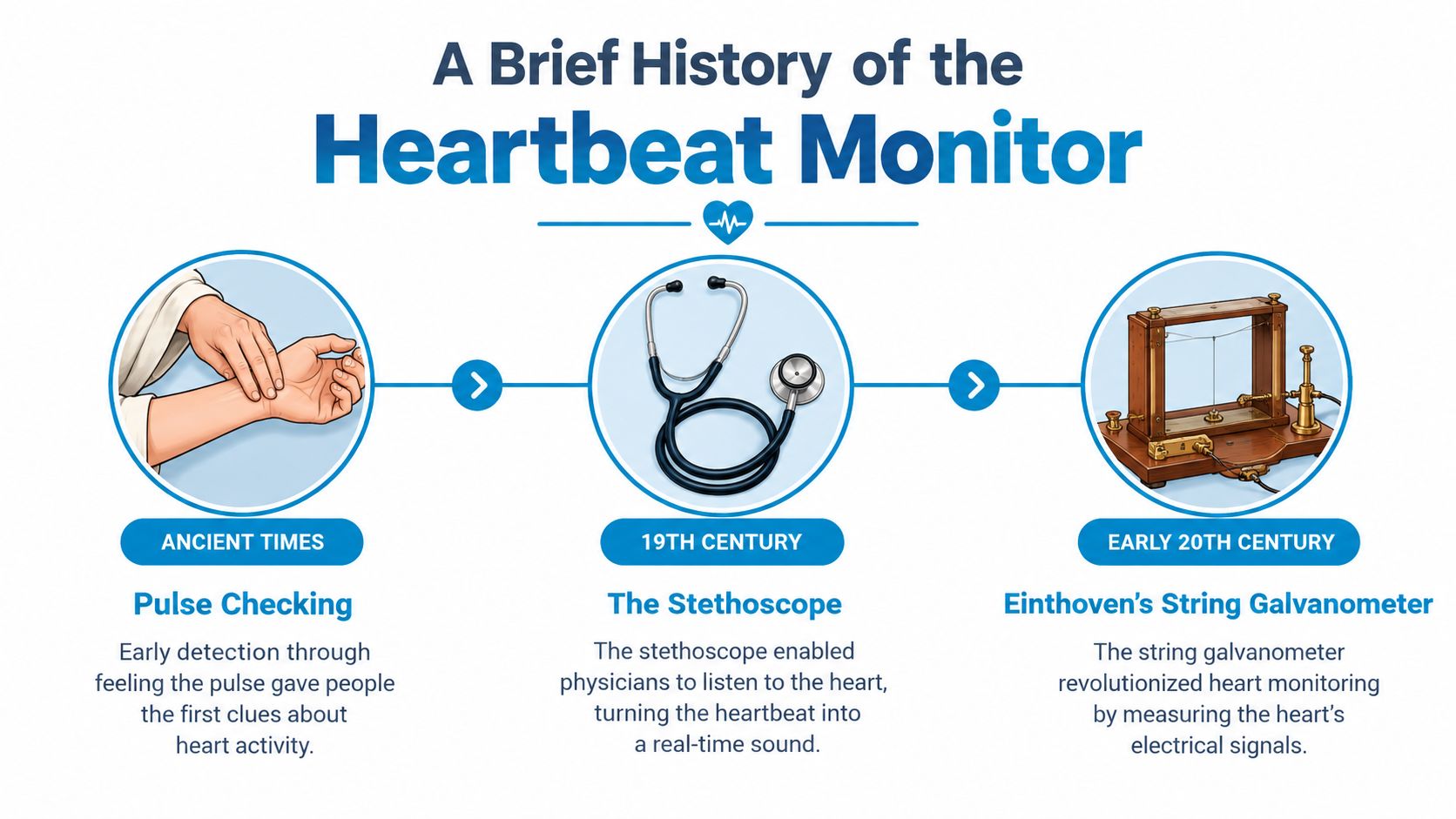
A Brief History of the Heartbeat Monitor
The modern monitor grew out of a long effort to make the pulse visible instead of merely felt. Early pulse checking was manual, then objective electrical recording arrived when Willem Einthoven formally established the ECG term in 1893 and the first successful clinical human ECG is widely dated to 1905. That lineage goes back even further, because Augustus D. Waller recorded a human electrocardiogram in 1887 with a capillary electrometer, proving that heartbeat tracing could be measured rather than guessed historical ECG timeline.
From clinic rooms to daily life
The big leap came with Norman Holter's ambulatory ECG, first developed in 1949 and later described as a portable continuous monitor in the 1950s and early 1960s. That mattered because a clinic snapshot can miss what happens during ordinary movement, stress, sleep, or symptom flares. Continuous recording turned the heart's activity into something doctors could study outside the hospital.
Consumer heart rate monitors came later, starting with wireless versions in the late 1970s and retail sales in the early 1980s. That shift changed the meaning of “heartbeat monitor” for everyday readers. The phrase no longer pointed only to a hospital machine, it also pointed to devices people could wear while training, walking, or just checking how their body responds during the day.
The history explains the naming confusion. The more personal and portable the device became, the more likely people were to use one phrase for several different tools.
Heart Rate Monitor vs ECG and EKG
A heart rate monitor and an ECG/EKG both relate to the heart, but they answer different questions. A heart rate monitor tells you how fast the heart is beating. An ECG records the heart's electrical pattern, which helps clinicians spot rhythm changes that a simple pulse reading can miss.
| Feature | Heart Rate Monitor | ECG / EKG |
|---|---|---|
| What it measures | Beats per minute | Electrical activity of the heart |
| Common form | Watch, chest strap, wearable sensor | Clinic machine or ECG-capable wearable |
| Main output | Rate trend | Rhythm tracing |
| Best for | Exercise tracking, general trends | Rhythm evaluation, symptom investigation |
ECG and EKG refer to the same test. The label changes, but the clinical purpose does not. During a symptom check, a clinician may look for skipped beats, a fast rhythm, or a change that lines up with dizziness, chest discomfort, or palpitations.
That difference matters because the right tool depends on the question. If you want effort tracking, a heart rate monitor is usually enough. If you want rhythm investigation, an ECG or EKG is the better fit, and Can EKG Show Heart Problems explains why a tracing can answer more than a pulse number can.
Holter Monitors and Other Ambulatory Devices
A Holter monitor is the device clinicians use when a quick office ECG is not enough. It is a portable ambulatory ECG recorder that tracks the heart continuously for 24 to 72 hours, using skin electrodes and a small recorder while you go about your day Mayo Clinic Holter monitor overview. That longer window matters because many symptoms are intermittent, so they may never appear during a short appointment.
Why continuous recording changes the picture
A brief reading can miss the moment palpitations start, dizziness peaks, or an unusual rhythm comes and goes. Holter monitoring helps clinicians see when an event starts, how long it lasts, and what surrounds it. Standard reports can include total heartbeats, average heart rate, maximum and minimum heart rate, premature beats, tachyarrhythmia duration, and ST-segment changes, as outlined in ambulatory cardiac monitoring guidance.
Other ambulatory devices fit other symptom patterns. An event monitor is used when episodes are less frequent and the user or device triggers a recording at the right moment. A patch recorder stays on the chest and can collect longer stretches of data in a simpler format. The right tool depends on how often the symptom appears and whether the clinician needs continuous rhythm evidence or a symptom-triggered snapshot.
Clinical habit to remember: if a symptom is hard to reproduce in a room, a longer recorder is often more useful than another short ECG.
Consumer Wearables vs Medical Monitors
Consumer wearables and medical monitors often sit in the same conversation, but they serve different goals. A wearable is usually built for daily tracking and pattern awareness. A medical monitor is built for diagnosis, documentation, and clinician review. The distinction matters because the same heart number can be useful in one setting and insufficient in another.
| Feature | Consumer Wearable | Medical Monitor |
|---|---|---|
| Main purpose | Wellness tracking and trend spotting | Diagnostic review and clinical documentation |
| Output style | Rate trends, alerts, summaries | Rhythm data, clinician-readable reports |
| Typical use | Training, casual monitoring, symptom awareness | Evaluation of symptoms, rhythm concerns, follow-up care |
| Decision value | Helps you notice patterns | Helps a clinician assess a problem |
A smartwatch that includes ECG capability can sit between those categories. It may let you capture an episode when symptoms happen, but it still doesn't replace a workup when a clinician needs a formal rhythm review. That's why people often use wearables as a bridge, not an endpoint.
How Does the Heart Monitor Work
Heartbeat Monitors for POTS and Orthostatic Tachycardia
POTS is typically described as a sustained heart rate increase of 30 beats per minute or more within ten minutes of standing, without the matching blood pressure drop that would explain it. That makes it a special case, because the issue isn't just a fast pulse, it's a pulse that changes with posture and daily activity. Generic fitness graphs often smooth over exactly the moment a person stands up, which is why the wrong monitor can leave the story half told.
What matters in a POTS-friendly device
A useful monitor for orthostatic tachycardia should show raw beat-to-beat heart rate, not just a broad average. It also helps when the data can be tied to a time-stamped posture change, a symptom log, and a resting baseline for comparison. Clinicians often want clean exportable data, because a specialist can review patterns faster when the log shows exactly when the person stood, felt dizzy, or recovered.
That's where structured recording beats casual checking. Tilt-table protocols, standing tests, and lean tests all depend on timing, so the monitor has to preserve timing too. If the device can't show the rise, the duration, and the context, it may still be useful for wellness, but it's less helpful for a dysautonomia review.
The practical rule is simple. For POTS-style symptoms, don't chase the highest number, chase the clearest sequence: rest, stand, rise, symptoms, recovery. A monitor that preserves that sequence is far more valuable than one that only produces an average.
If the reading changes when posture changes, you need a device that keeps the timing intact, not one that only smooths the line.
Common Misconceptions About Heartbeat Monitors
One common mistake is assuming every wrist or chest device is a medical monitor. It isn't. Some are wellness tools, some are ECG-capable devices with narrow approved uses, and some are clinical recorders that belong in a diagnostic workflow. That difference matters because a device can be accurate for its intended job without being a substitute for medical evaluation.
Another misconception is that continuous data automatically equals a diagnosis. Continuous data is only evidence until a clinician interprets it. A single high reading can also be misleading if it came after exercise, stress, motion, or recovery from activity. The reading has to be placed in context before anyone calls it anxiety, arrhythmia, or anything else.
Pulse oximeters create confusion too. They can estimate pulse while checking oxygen saturation, but that doesn't make them a general heart rhythm tool. If symptoms are recurring, changing, or paired with fainting, chest discomfort, or marked shortness of breath, the safer move is to bring the pattern to a clinician rather than trying to label it yourself.
Choosing the Right Monitor for Your Goal
The best monitor is the one that matches the question you're trying to answer. If your goal is fitness, a wrist or chest-based heart rate monitor is usually the right fit because it tracks effort and recovery in real time. If your goal is symptom investigation, an ECG-capable wearable or another device that preserves the rhythm during an episode is more useful. If your goal is clinical review, a physician-prescribed Holter, event monitor, or patch recorder gives the kind of documentation a clinician can work with.
Match the device to the job
| Goal | Recommended Device | Key Feature | When to Upgrade |
|---|---|---|---|
| Fitness tracking | Heart rate monitor | Live beats per minute | Upgrade if you need rhythm detail |
| Symptom investigation | ECG-capable wearable | Captures an episode while it happens | Upgrade if symptoms are frequent or unclear |
| Clinical review | Holter, event, or patch monitor | Clinician-readable recording | Upgrade if the office ECG keeps missing episodes |
A good buying decision also comes down to practical details, like battery life, export format, and whether the app gives you a readable report you can bring to an appointment. For people with orthostatic symptoms, the ability to keep a clean log matters as much as the sensor itself. One consumer app in this space, Cardiogram, reads Apple Health heart-rate data and turns tachycardic episodes into structured reports for review.
If you're still unsure which name fits your situation, start with the question your device needs to answer, not the label on the box. Then choose the monitor that matches that job, whether that means fitness tracking, symptom capture, or formal evaluation.
If you want a clearer way to turn heart-rate data into something useful at an appointment, take a look at Cardiogram. It's built to organize tachycardic episodes, timing, and context from Apple Health so the pattern is easier to review.