
The most popular advice about the Apple Watch Health app is also incomplete: better sensor accuracy doesn't automatically produce better health decisions. A watch can capture a useful heart-rate record and still leave you unsure whether a spike came from exercise, standing, recovery, stress, or a meaningful autonomic pattern.
That distinction matters for people living with unexplained palpitations, POTS, or dysautonomia. The native app is valuable for collecting and reviewing health information, but raw graphs rarely answer the questions patients and clinicians need: When did an episode begin? How long did it last? What was happening at the time? Did symptoms appear with it?
The Gap Between Sensor Accuracy and Actionable Insights
A heart-rate number is an observation, not an interpretation. If the Apple Watch records a high reading, it tells you what the sensor detected at that moment. It doesn't automatically explain whether the change reflects a workout, a normal recovery response, dehydration, medication timing, anxiety, illness, or a postural transition.
Apple's own health strategy illustrates this difference. The company has emphasized more accurate sensing, while criticism of the Health app has focused on its limited interpretation. Apple has also described a redesigned Health app as moving toward “actionable insights”, which acknowledges that collecting more information doesn't solve the problem of knowing what to do with it. The reported critique of the Health app's interpretation gap is particularly relevant to chronic conditions, where context often matters more than a single measurement.
Data collection isn't clinical interpretation
The Apple Watch Health app is designed for broad health and fitness use. Its charts help users inspect heart rate across different time ranges, notice changes, and review related records. That foundation is useful, but a person with dysautonomia may need a more focused analysis:
- Baseline comparison: How far did the heart rate rise from the preceding resting level?
- Duration: Did the elevation persist, or was it only a brief reading?
- Postural context: Did symptoms begin after standing or moving upright?
- Activity filtering: Was the reading captured during exercise or recovery?
- Symptom association: Did dizziness, fatigue, palpitations, or brain fog occur at the same time?
A generic graph usually requires the patient to reconstruct these details manually. That reconstruction becomes difficult when episodes happen unpredictably or when symptoms affect memory and concentration.
Practical rule: Treat the watch as a measurement source, not as a diagnosis. A pattern can support a conversation with a clinician, but it can't replace clinical assessment.
Why more accuracy isn't enough
Higher-quality measurements can improve the raw material for analysis. They can help capture peaks, identify episode boundaries, and show whether a change was brief or sustained. But accuracy doesn't provide a definition of a clinically relevant event, and it doesn't remove the need to separate exercise-related elevations from orthostatic changes.
That is why the central question is not just, “How accurate is my Apple Watch?” A more useful question is, “Can I turn its readings into a clear, contextual record that another person can review?” For chronic conditions, the answer may require a companion layer that organizes the data around symptoms, triggers, timing, and longitudinal patterns.
Evolution of the Apple Watch Health Ecosystem
The Apple Watch health ecosystem began as more than a watch display. At Apple's September 9, 2014 event, the company introduced the Health app and HealthKit alongside the original Apple Watch announcement, placing health data at the center of the ecosystem from the beginning. The event coverage and early platform history show how Apple positioned the watch and iPhone as connected parts of a broader health-data system.
The platform then expanded in stages. Apple added ECG read access in HealthKit in 2020 and sleep-stage support in 2022. In 2023, Apple added new data types and workout APIs, while the Health app arrived on iPad. Those milestones show a shift from basic activity tracking toward a repository that can hold richer wellness and clinically relevant records across devices.
HealthKit as the organizing layer
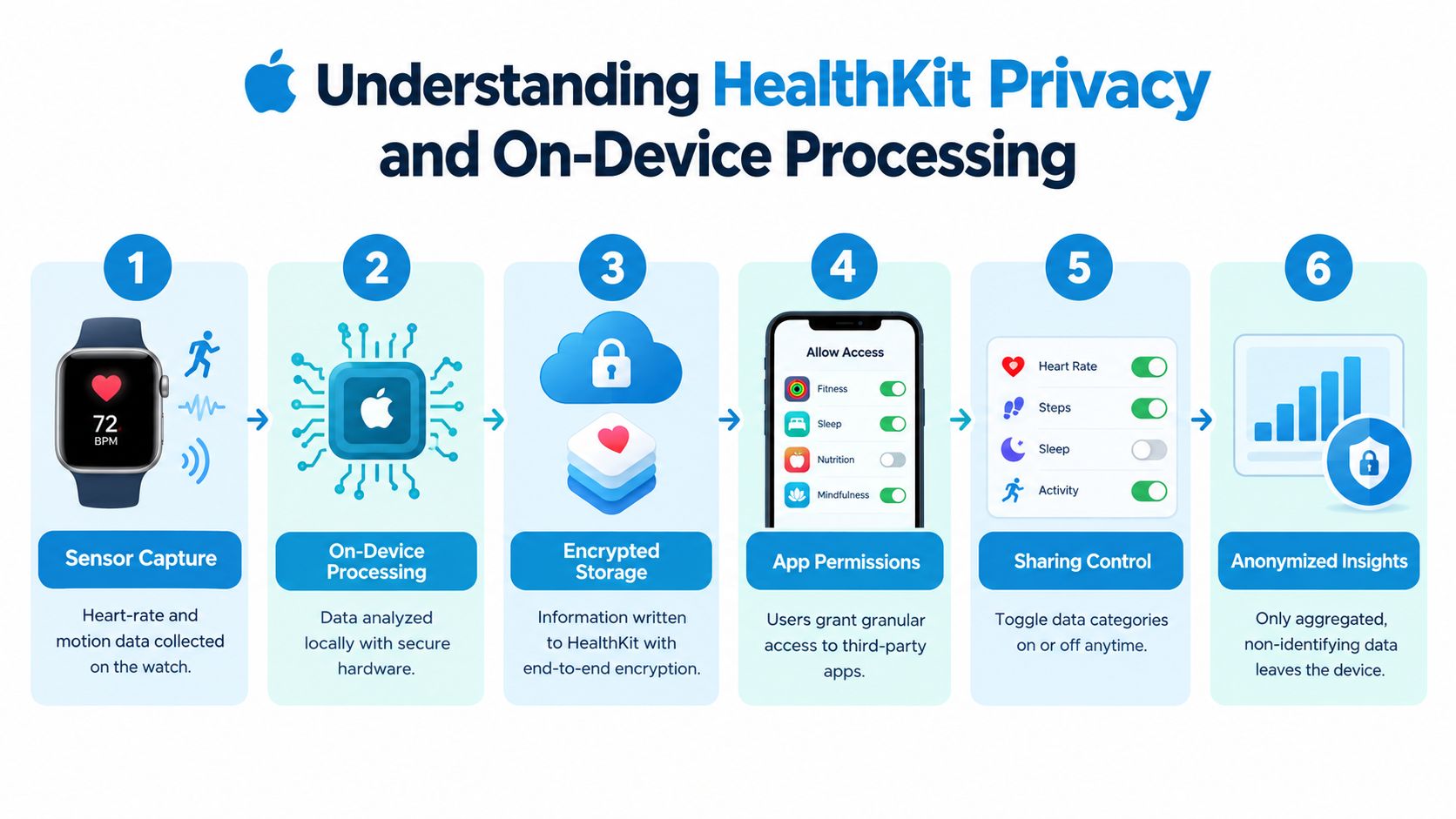
The Apple Watch produces measurements, but HealthKit gives those measurements a structured place to live. Apple describes HealthKit as a central repository for health and fitness data on iPhone and Apple Watch, while the Health app acts as the user-facing hub.
That distinction helps explain why the Apple Watch Health app can support more than one device or one feature. The watch can collect heart-rate information, the iPhone can display and organize it, the iPad can provide another viewing surface, and authorized apps can analyze permitted categories. The system is therefore better understood as a long-running health data platform than as a set of isolated watch features.
Apple has also highlighted the research scale connected to Apple Watch health data. An Apple Health report said one Apple Watch study enrolled more than 400,000 users from all 50 U.S. states in eight months. Apple's Health Report presents that participation as evidence that the ecosystem can support population-level research, not just individual fitness tracking.
What the history means for patients
The platform's growth gives patients a durable record rather than a one-time snapshot. A clinician may be able to review patterns across ordinary days, sleep periods, workouts, and symptom logs, provided the relevant data was collected and permission was granted.
However, a larger repository also creates a usability challenge. More data can make the patient's question harder to answer if the interface doesn't organize it around a specific condition. The platform has become more capable, but capability and interpretation remain separate problems.
Understanding HealthKit Privacy and On-Device Processing
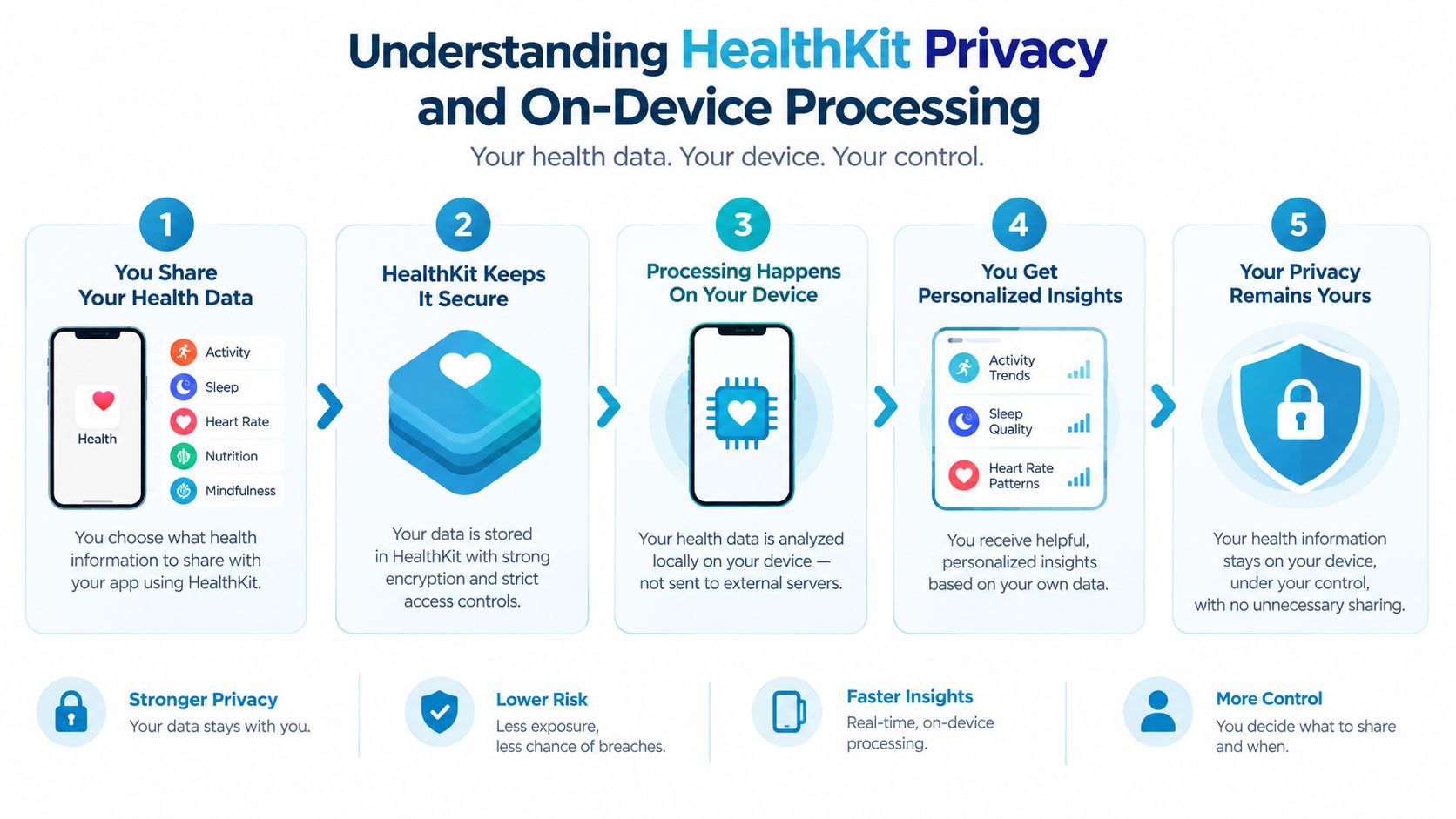
Privacy concerns are reasonable when heart-rate records are involved. The important point is that Apple Health data isn't treated like an ordinary public cloud dataset. Apple's privacy documentation says metrics shown in Health, including resting heart rate and Trends & Highlights, are calculated on device, and HealthKit data is end-to-end encrypted when the device has a passcode and two-factor authentication enabled. Apple's Health privacy white paper explains the protection model in technical detail.
What on-device processing means
On-device processing means the phone can calculate certain summaries without sending the underlying health records to a remote service for that calculation. For someone monitoring tachycardia, this matters because an analysis app can work with structured HealthKit records while keeping the processing within the user's device environment.
HealthKit also uses a protection class that becomes inaccessible after the device locks. The data becomes available again only after authentication with the passcode, Face ID, or Touch ID. That design improves protection if someone gains physical access to the phone, but it creates a practical limitation for apps that expect uninterrupted background access.
Permission still belongs to the user
A companion app can't assume it may read heart-rate data just because the information exists in Health. The user must grant explicit permission for the requested categories. Read access and write access are separate decisions, so a user can permit analysis of heart-rate records without allowing an app to add information to the core health profile.
Before approving access, check:
- Which categories are requested? The request should match the app's stated purpose.
- Is access read-only? Read-only access limits the app to analyzing existing records.
- Where does processing occur? The privacy explanation should describe whether analysis happens on the device.
- What happens when the phone is locked? Secure locking can limit background availability.
For a plain-language explanation of permission choices and data handling, review this guide to Health data privacy and permission controls. Privacy protection doesn't make an app medically accurate, but it gives users a clearer basis for deciding how their records may be analyzed.
Native Limitations for Tachycardia and POTS Monitoring
The native Health app is strong at showing general trends, but POTS monitoring requires context. A heart rate that rises during a workout has a different meaning from a rise that follows standing still. If both events appear as high readings on a graph, the patient still has to distinguish them.
Apple says the watch automatically sends heart-rate measurements to Health on iPhone, where users can browse records across hour, day, week, month, and year views. Apple also says the watch monitors heart rate for the Heart Rate app, workouts, and mindfulness sessions by default, although users can disable or re-enable collection in Privacy & Security settings. Apple's heart-rate documentation describes the collection system and its available views.
The same spike can mean different things
Consider two readings that look similar in the Health app:
- During a brisk walk, the rise may be an expected response to exertion.
- After standing from a seated position, a sustained rise paired with dizziness may deserve a different clinical conversation.
- During recovery after exercise, the heart rate may stay high for reasons unrelated to an orthostatic episode.
- During a stressful moment, symptoms and heart rate may change together without identifying the underlying cause.
The native interface doesn't automatically turn those situations into separate clinical categories. It may show timing and magnitude, but it doesn't consistently connect the reading with posture, symptoms, hydration, medication changes, or activity context.
Why false positives and missed patterns matter
An unfiltered episode list can overstate the number of meaningful events by counting exercise or recovery. The opposite problem can also occur. A patient may experience a short-lived or irregular episode that gets lost among ordinary fluctuations, especially when reviewing a long period manually.
Newer Apple Watch models are described by Apple as measuring heart rate every five seconds throughout the day, using larger green LEDs in the optical heart sensor. Apple's heart-rate documentation indicates that denser sampling can support better peak capture and duration estimates. Yet the same data can still be misinterpreted if activity periods aren't filtered.
A denser stream improves the record. It doesn't decide what the record means.
For POTS or dysautonomia, the useful output isn't a collection of isolated peaks. It's a longitudinal view that relates changes to posture, symptoms, triggers, and duration. That requires analysis designed around the patient's question rather than around general fitness summaries.
Extending Analysis with Companion Apps Like Cardiogram
A specialized companion app can add an interpretation layer without replacing Apple Health. It reads permitted heart-rate data, applies a defined rule, filters obvious sources of noise, and presents the result as episodes or trends that a patient can discuss with a clinician.
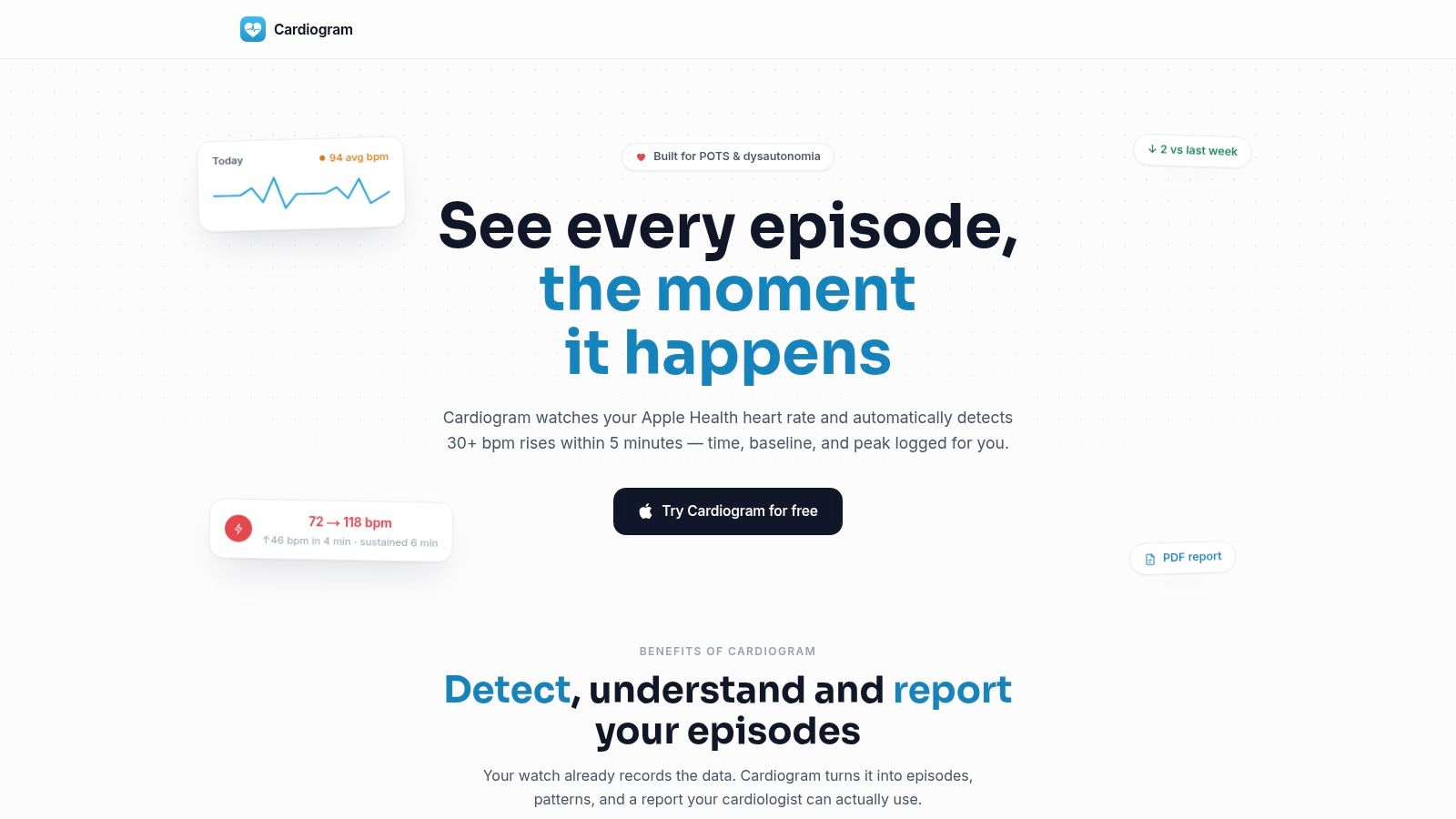
Cardiogram, for example, analyzes Apple Health heart-rate data to identify tachycardic episodes and related patterns. Its stated workflow includes detecting rises of 30 or more beats per minute within five minutes, then recording the baseline, peak, sustained duration, and time of occurrence. This criterion is a monitoring rule, not a diagnosis, and users should discuss the resulting patterns with a qualified clinician.
From readings to episode records
The difference is the unit of analysis. The Health app primarily presents measurements and summaries. A condition-focused app can treat an episode as a structured record with several fields:
- Starting point: The heart-rate baseline before the rise.
- Magnitude: How far the rate increased.
- Persistence: Whether the elevation continued.
- Timing: When the event occurred.
- Context: Whether a workout or recovery period explains it.
- Symptoms: What the person felt while it happened.
The app's context-aware filtering excludes workouts and recovery periods from episode counts. That doesn't prove that every remaining event is caused by POTS, but it reduces a common source of confusion and makes the resulting list easier to review.
Add the symptoms that numbers can't capture
Heart rate alone can't describe dizziness, fatigue, palpitations, brain fog, hydration, salt intake, sleep, or medication changes. Logging those details next to an episode can reveal whether symptoms cluster around particular times or circumstances.
Weekly summaries, resting-heart-rate trends, and episode heatmaps can also make repeated patterns visible. A clinician may not need every individual reading. They may need to know whether episodes appear on particular days, whether symptoms recur with them, and how the pattern changes over time.
The privacy model remains important. A read-only HealthKit integration can analyze existing records without writing back to the user's core health profile, while on-device processing keeps the analysis within the device environment described earlier. For a broader explanation of how a heart-rate tracking app can organize this information, see this guide to a heart-rate tracker app.
Preparing Clinician-Ready Reports for Appointments
A phone graph rarely tells a complete clinical story. Before an appointment, start by deciding what you want the clinician to evaluate: repeated episodes, dizziness after standing, medication timing, changes in resting heart rate, or the relationship between symptoms and daily activity.
Suppose you've noticed several episodes during ordinary daytime activities. Instead of showing a long scrolling chart, gather a report that identifies the detection rule, lists the timing and duration of episodes, and connects each event with the symptoms or triggers you logged. The report should help the clinician see the pattern without requiring them to reconstruct it from raw points.
Build the report around questions
Use a short preparation checklist:
- Define the concern: Write one sentence describing the main symptom or pattern.
- Review the timeline: Look for repeated timing, symptom clusters, or changes from your usual baseline.
- Separate activity: Mark workouts and recovery so they aren't mistaken for unexplained tachycardia.
- Record context: Include sleep, hydration, salt intake, medication changes, and notable symptoms.
- Export the summary: Choose a PDF or other shareable format that preserves dates, criteria, and episode details.
A report should state how events were detected. Without the rule, a list of “episodes” can sound more definitive than it is. With the rule included, the clinician can judge whether the method is useful alongside examination, medical history, and any formal testing.

Make review easier during the visit
Lead with a concise summary, then provide supporting detail. A useful appointment packet might include:
- The main question, such as whether recurring upright episodes warrant further evaluation.
- A trend overview, showing how resting heart rate or episode frequency changed.
- Representative events, with baseline, peak, duration, time, and symptoms.
- Context notes, including activity, hydration, sleep, and medication changes.
- Questions for follow-up, written before the appointment so they aren't forgotten.
You can also tailor the output to the recipient. Guidance on customizing health reports can help you decide which details to emphasize for a cardiologist, electrophysiologist, or primary care clinician.
The report isn't a diagnosis and shouldn't replace urgent medical care. Seek immediate professional help for severe or rapidly worsening symptoms, fainting, chest pain, serious breathing difficulty, or other emergency warning signs. Used appropriately, a structured report gives your clinician a clearer starting point than a collection of disconnected screenshots.
Cardiogram analyzes Apple Health heart-rate data for tachycardic episodes, adds symptom and trigger context, and creates structured summaries for clinician review. If you want to move beyond raw Apple Watch graphs, visit Cardiogram to explore its monitoring and reporting features.