An Apple Watch doesn't give you a blood pressure number in mmHg, and it can't do a spot check on demand. It screens for possible hypertension by looking at heart sensor patterns over about 30 days, then prompts you to confirm any concern with a cuff.
That distinction matters most in an ordinary, uneasy moment. You stand up, feel lightheaded, tap your wrist, and see a heart rate. It's natural to wonder whether pressure is hidden in that same screen. It isn't, but what the watch does see can still be useful when you understand its limits.
What People Mean When They Search I Watch Blood Pressure
You feel dizzy after standing, your heart seems to race, and you raise your wrist looking for answers. The watch shows heart rate, maybe a recent range or a workout graph, but no systolic or diastolic number. That's usually the moment people search for I Watch blood pressure help.
They're often asking three different questions at once. Can the watch measure pressure right now? Can it warn me if my pressure runs high over time? And if I'm dizzy, can it tell me whether pressure dropped when I stood? The answers aren't the same, and separating them prevents false reassurance.
Three Things to Keep Separate
- Pulse is not pressure: The watch tracks how often your heart beats and how blood volume in your wrist changes with each beat. It doesn't squeeze your arm or directly measure force inside an artery, so it can't produce a cuff style value.
- Screening is not measurement: Apple's hypertension feature looks for a persistent pattern over time and may send a notification. According to Apple's guide to hypertension notifications on Apple Watch, that notice directs you to confirm the finding with a third party blood pressure cuff.
- A symptom moment needs context: Dizziness on standing can involve heart rate, blood pressure, hydration, medication, illness, or other causes. A single pulse reading can't sort that out by itself.
Practical rule: Treat the watch as a prompt to verify, not as the verification itself.
This model can feel disappointing if you expected a number like you get at a pharmacy machine. It's also protective. A made up looking number would be easy to overtrust, especially when you're deciding whether to rest, call a clinician, or adjust a medication.
A better expectation is simpler. Use your watch to notice patterns over time, use a validated cuff when you need an actual pressure reading, and use your symptoms as important information too. If you feel faint, sit or lie down safely rather than standing still to get a perfect watch reading.
You're not doing anything wrong by checking your wrist. You're looking for clarity. The goal is to match each tool to the job it can do, so a helpful signal doesn't turn into a misleading answer.
How the Apple Watch Reads Your Heart Without a Cuff
Think of the sensor on the back of the watch as a small flashlight and a light detector working together. Green light shines into the skin of your wrist. Blood absorbs some of that light, and the amount reflected back changes as blood volume rises and falls with each heartbeat.
That method is called photoplethysmography, usually shortened to PPG. It's a mouthful, but the idea is plain. More blood in the tiny vessels under the sensor changes the reflected signal one way, less blood changes it another way, and the watch turns that repeating pattern into heart rate.
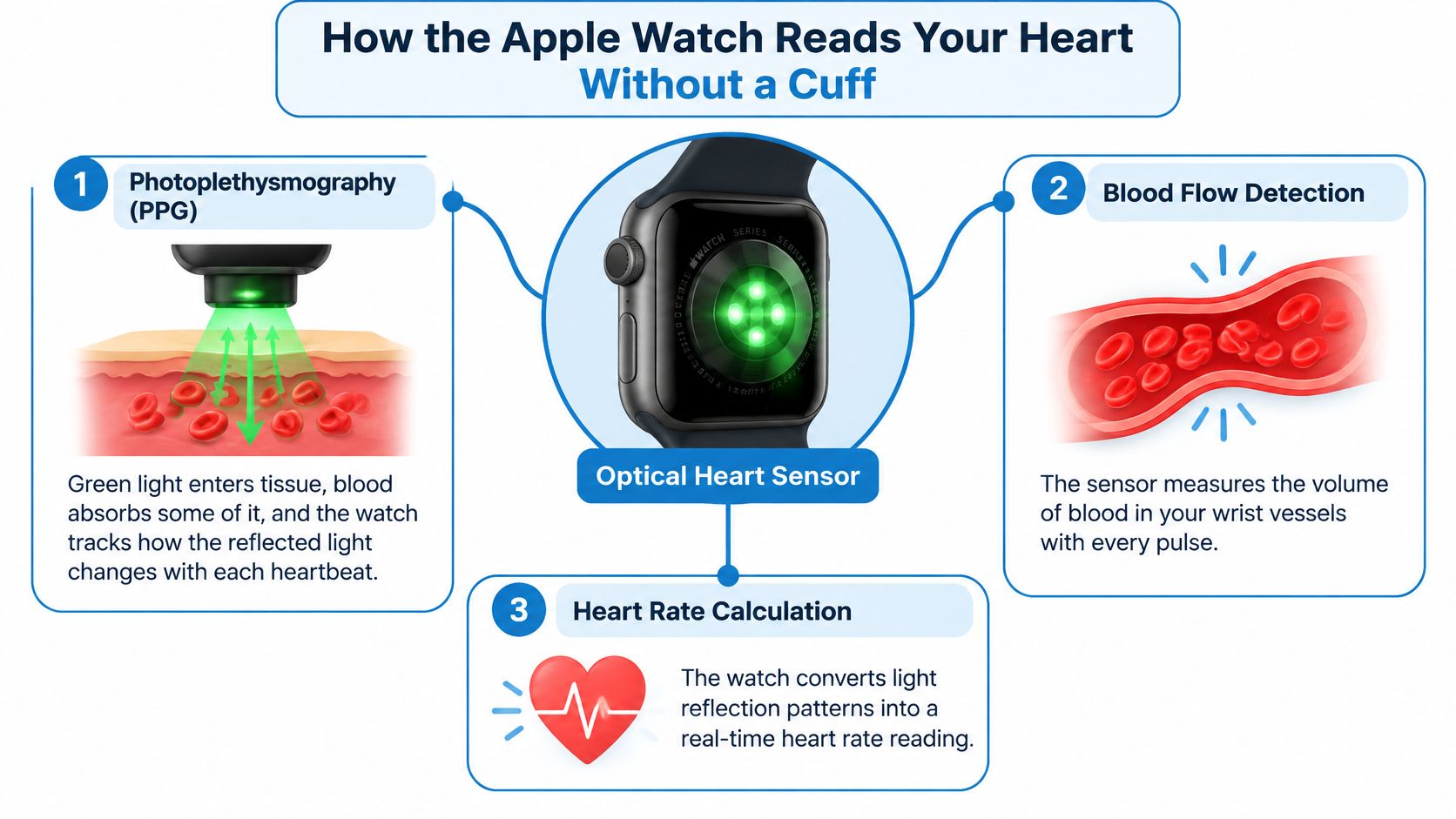
If you want more detail on the sensor itself, this explanation of how a heart monitor works walks through the basics in everyday language. The key point for blood pressure is what PPG doesn't do. It observes a pulse related signal at the skin surface, it doesn't occlude an artery and listen or sense pressure as a cuff does.
From Pulse Patterns to a Screening Notice
For hypertension notifications, the watch doesn't judge one beat or one afternoon. It analyzes optical heart sensor data over a 30 day evaluation period and looks for patterns associated with chronic hypertension, as described in the opening. That long window is the point. Chronic high blood pressure is a sustained condition, not a single stressful minute.
Imagine you're trying to learn whether a street is usually busy. One car passing tells you little. Watching at different times over many days gives you a better sense of the usual pattern, though you still haven't counted every car with a traffic counter. The watch works in a similar, indirect way.
Several real life factors can blur that signal:
- Motion and fit: A loose band, exercise, or a wrist position that breaks skin contact can distort readings.
- Body state: Vascular tone, posture, and irregular rhythms can change what the sensor sees.
- Individual differences: The same reflected pattern doesn't translate into the same pressure for every person without calibration.
That's why the output is a probabilistic notification, not a number. The watch is saying, in effect, that your long term pattern looks enough like patterns linked with hypertension to deserve a proper check. It isn't saying your pressure at 2.15 p.m. was a specific value.
This is still meaningful progress from looking at heart rate trends alone. Passive, longitudinal screening can nudge someone who feels fine to get measured. It just can't finish the job on its own.
Who Can Receive Hypertension Notifications and Where
One reader opens the Health app looking for the hypertension notification switch and finds nothing there. Another, already taking blood pressure medication, assumes the watch will now keep track of their pressure for them. Both are reasonable readings of the headlines, and both can lead to a wrong conclusion, so it helps to check yourself against the intended use before waiting for a notice that may never be designed to arrive.
The feature works like a screening program with entry criteria. Programs like these only produce meaningful results for the people they were designed to include. Outside that group, silence carries no information at all.
The clearest boundary is diagnosis status. The feature aims to flag possible undiagnosed hypertension, and Apple describes it as not intended to diagnose, treat, or monitor established hypertension. Someone already on treatment faces a different question, whether therapy is working, and that calls for cuff readings rather than a screening prompt.
After that, eligibility turns practical. The watch needs the sustained wear behind the 30 day evaluation before it can look for a pattern, so occasional use gives it little to work with. A supported model running current software is required, and Apple sets age and health criteria you can review in the Health app setup screens on your own device rather than assuming a family member's setup applies to you. Availability varies by country, because health features need local regulatory clearance, and moving or traveling can change what you see.
If the feature isn't available to you, your blood pressure hasn't been checked by default. You haven't entered that screening pathway yet.
That last point deserves a pause.
Apple states that Apple Watch is not a medical device intended to replace professional diagnosis, treatment, or monitoring. Read it as a job description rather than legal wallpaper. The watch belongs alongside clinical measurement when a decision matters, never instead of it.
One more caution applies at the edges of the eligible group. A feature built and validated for a defined adult screening population shouldn't be stretched to reassure younger users or anyone outside that group. When in doubt, ask a clinician what screening schedule fits your age, history, and risk factors.
If you couldn't enroll, haven't worn the watch consistently, or already have a diagnosis, the absence of a notification says nothing about your pressure. A cuff based plan matched to your situation says far more.
What a Hypertension Notification Actually Tells You
A notification is easier to use well when you know how often it's right, and how often it stays quiet when it shouldn't. Two words help here, and they're worth learning slowly. Sensitivity asks, of people who have hypertension, how many got flagged. Specificity asks, of people who don't have it, how many were correctly left alone.
In the validation work, 2,229 adults without a prior hypertension diagnosis were enrolled and 1,863 supplied at least 15 days of usable data, with home blood pressure as the reference, according to the validation study of Apple Watch hypertension notifications. Overall sensitivity was 41.2% (95% CI, 37.2 to 45.3%) and specificity was 92.3% (95% CI, 90.6 to 93.7%) in that same report. Sensitivity for stage 2 hypertension was higher at 53.7%, and specificity among normotensive participants reached 95.3%, also in that report.
What Those Numbers Feel Like in Real Life
Picture 100 people with undiagnosed hypertension wearing the watch as directed. Roughly 41 would receive a notification, and about 59 wouldn't. That's the most important sentence in this section. A notice is a good reason to act, but no notice is a weak reason to relax.
Now picture people without hypertension. Most won't be flagged, which is reassuring and keeps false alarms relatively uncommon. Some still will be, and they'll need cuff checks to sort it out. A false alert costs time and worry, but a missed case can cost years of untreated risk, so the missed group deserves at least as much attention.
| Result | What it reasonably means | What it doesn't mean |
|---|---|---|
| Notification received | Your pattern warrants prompt cuff confirmation | You have a confirmed diagnosis or a known mmHg value |
| No notification | No qualifying pattern was detected in that window | Your blood pressure is proven normal |
This pattern first, confirmation second approach isn't new for wearables. The Apple Heart Study enrolled 419,297 participants without prior atrial fibrillation, and among 450 participants who returned analyzable ECG patches after an irregular pulse notice, atrial fibrillation was found in 34% (97.5% CI, 29% to 39%), according to the published Apple Heart Study results. Among those aged 65 or older, it was found in 35% (97.5% CI, 27% to 43%) in the same publication.
That study wasn't about blood pressure, and I don't want you to blur the two conditions. I mention it because the logic is familiar. A wearable spots a pattern worth checking, a more direct test follows, and only then does anyone talk confidently about diagnosis.
A watch alert should raise your attention. A quiet watch should not lower it very much.
Hold both ideas together and the feature becomes useful without becoming magical. It's a screening net with fairly wide holes, designed to catch some people who might otherwise go unnoticed. Your cuff, your history, and your clinician still decide what the catch means.
Confirming an Alert With a Validated Blood Pressure Cuff
A notification arrives mid-morning, and at that moment the watch has already done everything it can. It works like a smoke alarm rather than a thermometer: it tells you to look, and looking is the whole assignment. It never produced a mmHg value, so nothing on your wrist can settle the question it raised. A cuff has to.
Apple's confirmation workflow asks for twice daily cuff measurements over seven days with a third party cuff. Blood pressure drifts across the day, which is why one reading is only a single frame of a film. Seven mornings and evenings give your clinician the plot.
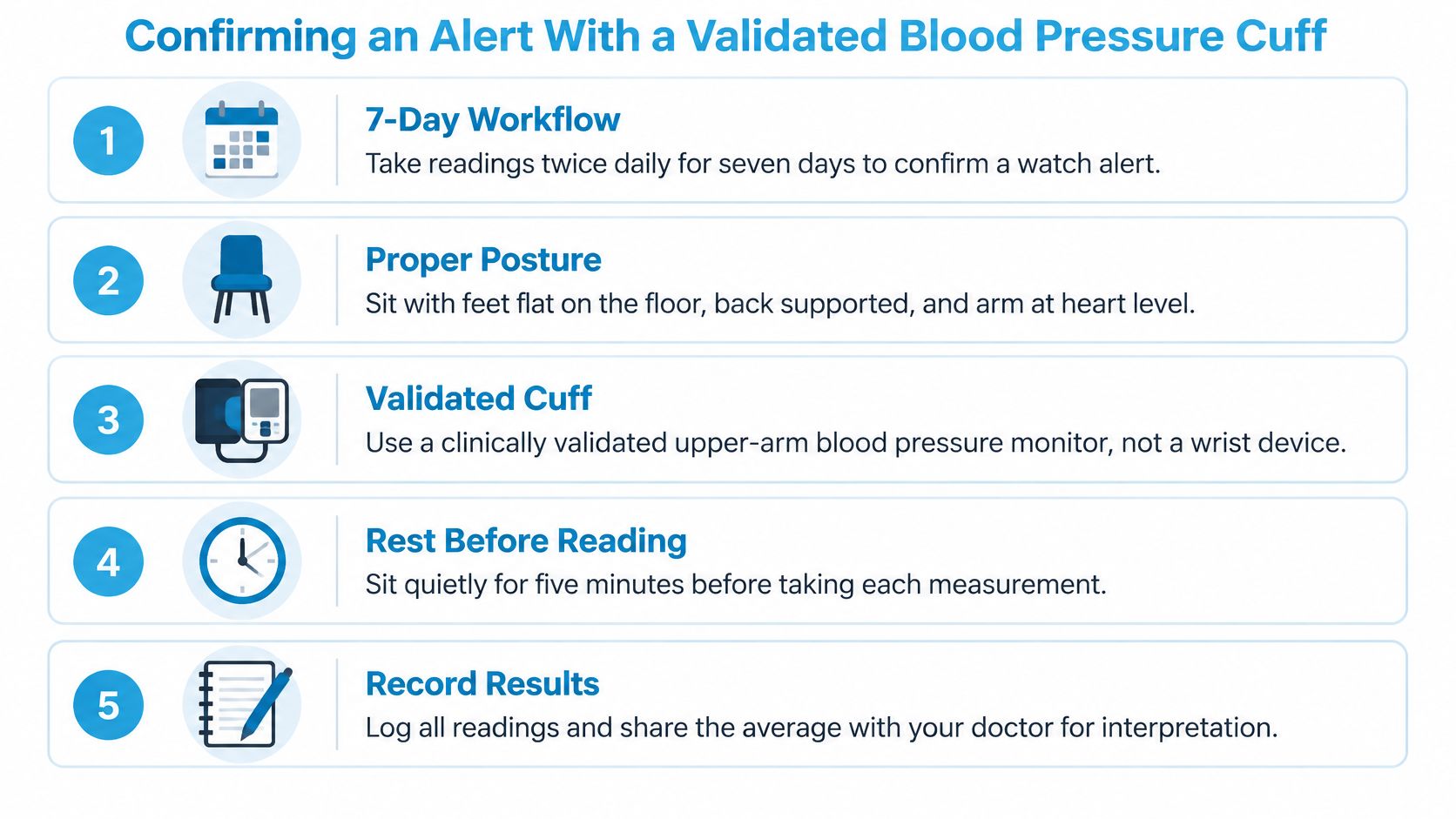
Whether that plot means anything depends on technique. Sit for several minutes first, and avoid measuring right after exercise, caffeine, or a tense call when you can help it, noting it when you can't. Then settle your body: back supported, feet flat, legs uncrossed, arm resting on a table at heart level so the table holds it rather than your muscles. Use a clinically validated upper arm cuff in the right size for your arm, since a poor fit skews every reading that follows. Write down each result with its date and time, including the numbers you dislike, because a log with convenient gaps tells a weaker story than an honest one.
The division of labor is worth keeping straight. The cuff produces a calibrated mmHg reading under conditions you can standardize and repeat. The watch produces an indirect signal under conditions you live through. Treatment decisions belong to the first kind of evidence.
That ordering matches the American Heart Association statement on cuffless blood pressure technologies, which says available cuffless technologies need more research and standardized validation before being used to diagnose, track, or treat hypertension.
So when the week ends, bring the full log and the notification itself to your clinician. Don't adjust medication on the strength of a watch alert or a lone home reading, and if your cuff numbers reach a range you've been told to treat as urgent, call promptly. The watch knocked. The cuff and your clinician decide what happens next.
Heart Rate Patterns, Orthostatic Symptoms, and the POTS Connection
You stand up, feel lightheaded, and notice your heart beating faster. An Apple Watch can help you record that pulse pattern and when it happens. It cannot measure your blood pressure during the episode.
The optical sensor uses photoplethysmography, or PPG, to detect changes in light reflected from blood moving through the wrist. Those changing signals help estimate heart rate, much like watching ripples to track movement in water. Over time, the heart-rate timeline in Apple Health can help you review when episodes occur, how quickly your rate rises, how long it stays high, and what you were doing. That record may be easier to discuss with a clinician than trying to recall each episode from memory.
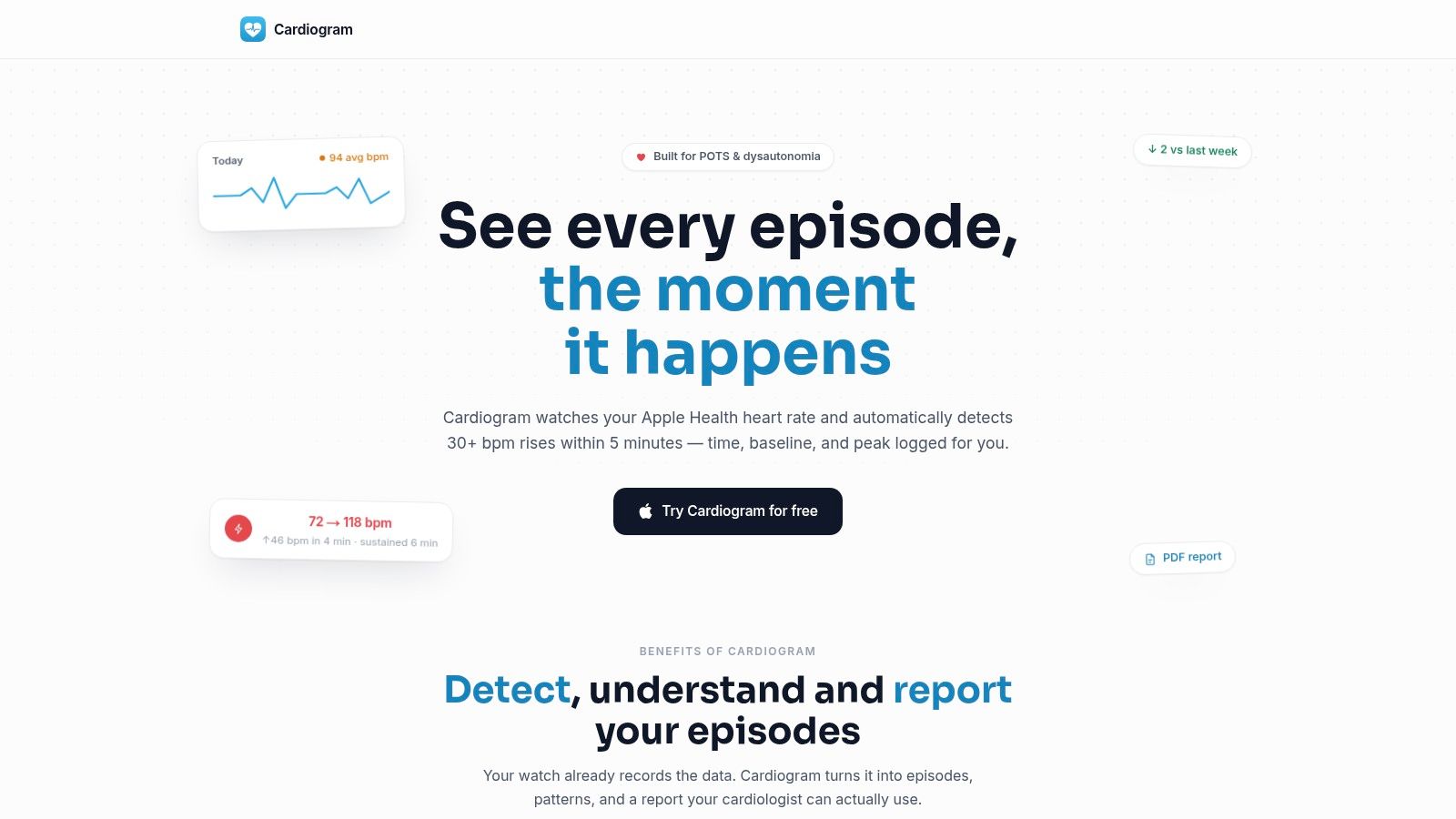
Cardiogram analyzes Apple Health heart-rate data to identify tachycardic episodes in people with POTS and dysautonomia. It can detect rises of 30 or more bpm within 5 minutes, record the baseline, peak, duration, and timing, and exclude workouts and recovery from episode counts. You can also record symptoms and context, such as dizziness, palpitations, fatigue, brain fog, hydration, salt intake, sleep, and medications, then export a PDF summary for clinical review.
For recurring symptoms after standing, the guide to orthostatic intolerance diagnosis explains how clinicians assess related conditions. POTS involves heart-rate response alongside symptoms; orthostatic hypotension involves a drop in blood pressure. The sensations can overlap, but the measurements clinicians use differ.
Drawing the Line Clearly
- Heart-rate apps can show: Episode timing, size of the rise, duration, resting trends, and links to symptoms recorded alongside watch data.
- They cannot show: Systolic or diastolic blood pressure during an episode unless a cuff reading is taken and entered or imported.
- Clinicians may use both: An episode log alongside blood-pressure measurements taken lying down, sitting, and standing.
A notebook can keep the evidence in view: the watch records pulse patterns, a cuff provides pressure readings, and symptom notes describe how you felt at the time. Together, these records give your clinician more context than any one measure alone.
When a Quiet Watch Should Not Make You Feel Reassured
A clean watch can feel like a clean bill of health. That feeling is understandable, and it's exactly where this feature can mislead a careful person.
About 58.8% of people with undiagnosed hypertension did not receive an alert, while about 8% of people without diagnosed hypertension received a false alert, as summarized alongside Apple's announcement of hypertension notifications on Apple Watch. In other words, the silence misses more people than it catches. Screening at population scale can still be a poor rule out test for you as an individual.
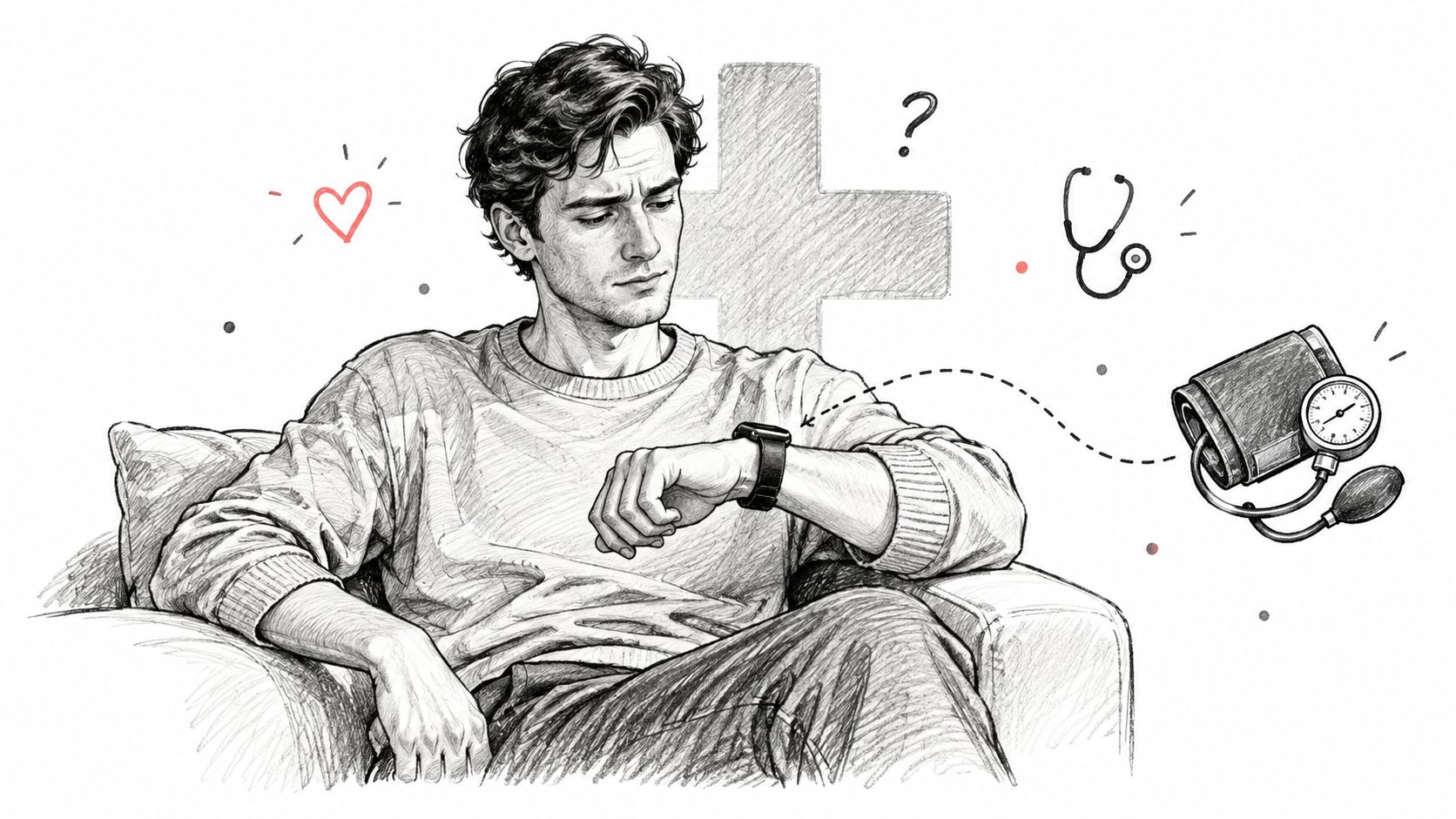
Be especially cautious if you're already being treated, if your cuff readings run high, or if symptoms keep recurring despite a quiet watch. In each case, the cuff and your clinical history outrank the absence of a notice. If dizziness on standing is part of your picture, these notes on orthostatic hypotension remedies may help you prepare better questions for your clinician.
Urgent symptoms change the order of operations completely. Chest pain, severe breathlessness, fainting, sudden weakness or speech change, or a severe unusual headache need immediate medical care, not watch checking. Don't wait for a wearable verdict that was never built for emergencies.
Trust a conflict as a signal in itself. When your body, your cuff, and your watch disagree, get the disagreement reviewed.
Practical Next Steps and Common Blood Pressure Questions
Use this short sequence if an alert, a high cuff reading, or recurring dizziness has brought you here.
- Confirm with a cuff: Follow the seven day, twice daily workflow after any hypertension notification, and keep every reading.
- Log the context: Note symptoms, posture, recent exercise, caffeine, illness, and medication timing beside unusual results.
- Book a review: Bring your cuff log, watch history, and medication list. Don't self adjust treatment from watch data.
- Ask about disagreement: A watch and cuff can differ because one infers a long term pattern and the other measures a moment. Your clinician can decide which result needs repeating.
- Ask about special situations: Pregnancy, a single very high reading, or symptoms with any reading deserve individualized advice rather than a generic schedule.
For ongoing home monitoring, ask your clinician how often to measure for a useful trend in your case. Consistency in technique matters more than collecting frantic readings all day.
If standing triggers a racing heart, dizziness, or brain fog, you don't have to reconstruct those episodes from memory at your next appointment. Cardiogram turns the heart rate data your Apple Watch already collects into structured episodes, symptom linked trends, and a clinician ready PDF you can share. Visit Cardiogram to start building a clearer record alongside your cuff measurements.